
AnleitungGuideGuide
Alles zur Segel-Wind CH App Tout sur l'app Segel-Wind CH Everything about the Segel-Wind CH app
So nutzt du die App optimal —
von Wind bis Abzeichen.
Utilisez l'app de façon optimale —
du vent aux insignes.
Get the most out of the app —
from wind to badges.
InhaltsverzeichnisTable des matièresContents
- 1 📲 App installieren (PWA)Installer l'app (PWA)Install the app (PWA)
- 2 🧭 Navigation
-
3 🌬 Wind & WetterVent & météoWind & weather
- 3.1 Standort wählenChoisir un lieuChoose a location
- 3.2 Beaufort & RichtungBeaufort & directionBeaufort & direction
- 3.2b Wind 10m (Masthöhe)Vent 10m (hauteur mât)Wind 10m (mast height)
- 3.3 WarnungenAvertissementsWarnings
- 3.4 NebelfrühwarnungAlerte brouillardFog early warning
- 3.5 Gefrierhöhe-WarnungAlerte altitude de gelFreezing level warning
- 3.6 LuftfeuchtigkeitHumidité de l'airHumidity
- 3.8 Diagramm & ForecastGraphique & prévisionChart & forecast
- 3.9 Luftdruck, Pegel & 72h-TendenzPression, niveau & tendance 72hPressure, water level & 72h outlook
- 3.10 Sichtweiten-WarnungAlerte visibilitéVisibility warning
- 3.11 Kaltfront-ErkennungDétection de front froidCold front detection
- 3.12 Sonne & Goldene StundeSoleil & heure doréeSun & golden hourSkipper
- 3.13 Gewitter-Früherkennung (Squall Alert)Alerte orages (CAPE)Squall early warning (CAPE)
- 3.14 Thermik-VorhersagePrévision des thermiquesThermal forecastCrew
- 3.15 🏆 Wochenvorschau-Push🏆 Push météo hebdo🏆 Weekly best pushMitseglerMatelotSailor
- 3.16 📤 Segel-Card teilen📤 Partager sa carte voile📤 Share sailing cardMitseglerMatelotSailor
- 3.17 📤 1-Tap Viral Share📤 Partage viral 1-tap📤 1-Tap Viral ShareMitseglerMatelotSailor
- 3.18 📱 Story Card 9:16📱 Story Card 9:16📱 Story Card 9:16MitseglerMatelotSailor
- 3.19 ⏱️ Trainings Timer⏱️ Minuteur Entraînement⏱️ Training TimerMitseglerMatelotSailor
- 3.20 ⚓ Drill Card Generator⚓ Générateur Drill Card⚓ Drill Card GeneratorMitseglerMatelotSailor
- 3.21 🚨 Pegelstand-Alarm🚨 Alerte niveau lac🚨 Water level alertMitseglerMatelotSailor
- 3.22 📅 Sailing Wrapped — Jahresrückblick📅 Sailing Wrapped — Bilan saison📅 Sailing Wrapped — Season reviewMitseglerMatelotSailor
- 3C ⚓ Ankerplatz-Finder (Crew)Finder mouillages (Crew)Anchor Spot Finder (Crew)Crew
-
3B ⚓ Skipper-Tools & TaktikOutils Skipper & tactiqueSkipper Tools & Tactics
- 3B.1 Foil-IndexIndex FoilFoil IndexSkipper
- 3B.2 VMG-Rechner & PolarenCalculateur VMG & polairesVMG Calculator & polarsSkipper
- 3B.2b Boot-Profile & Cloud-SyncProfils bateau & sync cloudBoat profiles & cloud syncSkipper
- 3B.3 Taktik-PlannerPlanificateur tactiqueTactics PlannerSkipper
- 3B.4 Layline-RechnerCalculatrice de lignesLayline CalculatorSkipper
- 3B.5 🏁 Regatta Countdown🏁 Regatta Countdown🏁 Regatta CountdownSkipper
- 3B.6 🚩 Regatta-Check🚩 Regatta-Check🚩 Regatta CheckSkipper
- 4 ⛵ SegelfensterFenêtres de navigationSailing windows
- 5 🟠 Individuelle SegelfensterFenêtres personnaliséesCustom sailing windows
- 6 📍 Orte & SeenLieux & lacsLocations & lakes
-
7 🗺 KarteCarteMap
- 7.1 Standorte-KarteCarte des sitesLocations map
- 7.2 CommunitykarteCarte communautaireCommunity map
- 7.3 Overlays (Crew)Calques (Crew)Overlays (Crew)Crew
- 7.4 📡 Live Törn aufzeichnen & teilen📡 Live Törn enregistrer & partager📡 Live trip record & share
- 7.5 📋 Crew-Briefing-Generator📋 Générateur de briefing📋 Crew briefing generatorMitseglerMatelotSailor
- 7.6 📓 Törn-Logbuch📓 Journal de bord📓 Trip logbookMitseglerMatelotSailor
- 7.7 Nautik-ChartCarte nautiqueNautical chartSkipper
- 7.8 BlitzortungSkipper
- 7.9 RegenradarRadar pluieRain radarSkipper
- 7.10 WindfelderChamps de ventWind fieldsSkipper
- 7.11 BadewasserqualitätQualité eauWater qualitySkipper
- 7.12 Seegrund-ReliefRelief lacustreLake floor reliefSkipper
- 7.13 Echtzeit-MessdatenDonnées temps réelReal-time measurementsSkipper
- 7.14 ⚓ Ankerplatz-Finder (Crew)⚓ Finder mouillages (Crew)⚓ Anchor spot finder (Crew)Crew
- 8 🏅 AbzeichenInsignesBadges
-
9 ⚓ Crew Mitglied werdenDevenir membreJoin the Crew
- 9.0 🎁 10 Tage gratis testen🎁 Essai gratuit 10 jours🎁 Free 10-day trial
- 9.1 MitseglerMarinSailor
- 9.2 Crew-MemberMembre d'équipageCrew Member
- 9.3 Skipper
- 9.4 📷 Community Foto-Feed📷 Feed photos communauté📷 Community photo feed
- 9.5 ⛵ Ich segle heute⛵ Je navigue aujourd'hui⛵ I'm sailing today
- 9.6 🎯 Bft-Wette🎯 Pronostic Bft🎯 Bft tip
- 9.7 🔥 Streak-Rangliste🔥 Classement série🔥 Streak leaderboard
- 10 📸 Segel-FotoPhoto voileSailing Photo
- 11 ❓ FAQ
- 12 🏆 Regatten-KalenderCalendrier régattesRegatta Calendar
- 13 🌊 Seen-GuideGuide des lacsLake Guide
App installierenInstaller l'appInstall the app
PWASegel-Wind CH ist eine Progressive Web App — du kannst sie wie eine echte App auf deinem Handy speichern, ohne den App Store zu brauchen. Sie startet direkt vom Homescreen und funktioniert schneller als im Browser.
Segel-Wind CH est une Progressive Web App — vous pouvez l'enregistrer sur votre téléphone comme une vraie app, sans passer par l'App Store. Elle démarre directement depuis l'écran d'accueil et est plus rapide que dans le navigateur.
Segel-Wind CH is a Progressive Web App — you can save it to your phone like a real app, without using the App Store. It launches directly from your home screen and runs faster than in the browser.
📱 iPhone / iPad (Safari)
🤖 Android (Chrome)
🖥 Wind-Widget — minimalistische Homescreen-SeiteWidget vent — page d'accueil minimalisteWind widget — minimal home screen page
| FarbeCouleurColour | BedeutungSignificationMeaning |
|---|---|
| GrünVertGreen | Bft 0–2 · Kein / leichter WindBft 0–2 · Pas de vent / très légerBft 0–2 · Calm / light air |
| GelbJauneYellow | Bft 3–4 · Angenehmer SegelwindBft 3–4 · Vent de navigation agréableBft 3–4 · Pleasant sailing breeze |
| OrangeOrangeOrange | Bft 5 · Frisch, für geübte SeglerBft 5 · Frais, pour marins expérimentésBft 5 · Fresh, for experienced sailors |
| RotRougeRed | Bft 6+ · Stark, nur für FortgeschritteneBft 6+ · Fort, réservé aux expérimentésBft 6+ · Strong, advanced sailors only |
So als Homescreen-Widget verwenden:Utiliser comme widget sur l'écran d'accueil :How to use as a home screen widget:
1. Öffne /widget.html im Browser · 2. Teilen-Symbol → «Zum Home-Bildschirm» (iOS) oder Dreipunkt-Menü → «Zum Startbildschirm» (Android). Der See, den du beim letzten App-Aufruf ausgewählt hattest, wird automatisch vorselektiert. 1. Ouvrez /widget.html dans le navigateur · 2. Symbole de partage → «Sur l'écran d'accueil» (iOS) ou menu trois points → «Ajouter à l'écran d'accueil» (Android). Le lac sélectionné lors de votre dernier usage de l'app est pré-sélectionné automatiquement. 1. Open /widget.html in the browser · 2. Share icon → «Add to Home Screen» (iOS) or three-dot menu → «Add to Home screen» (Android). The lake you last selected in the app is automatically pre-selected.
•
?embed=1 — versteckt Selector, Sprach-Umschalter und App-Link. Ideal für iFrames auf externen Webseiten. Der App-Link vereinfacht sich zu «segel-wind.ch».
•
?lang=de / fr / en — erzwingt eine bestimmte Sprache unabhängig vom Browser-Setting oder gespeicherter Einstellung.
Beispiel:
/widget.html?embed=1&lang=fr — eingebettetes Widget auf Französisch.
Zusätzlich zeigt das Widget jetzt das heutige Segelzeitfenster an — das Stundenfenster mit dem besten Wind wird farblich hervorgehoben (z.B. «14–18 Uhr»). Le widget supporte deux paramètres URL pour une utilisation avancée :
•
?embed=1 — masque le sélecteur, le sélecteur de langue et le lien vers l'app. Idéal pour les iFrames sur des sites externes. Le lien app se simplifie en «segel-wind.ch».
•
?lang=de / fr / en — force une langue particulière indépendamment du réglage du navigateur ou de la préférence enregistrée.
Exemple :
/widget.html?embed=1&lang=fr — widget intégré en français.
De plus, le widget affiche désormais la fenêtre de voile du jour — la plage horaire avec le meilleur vent est mise en évidence (ex. «14h–18h»). The widget supports two URL parameters for advanced use:
•
?embed=1 — hides the selector, language switcher and app link. Ideal for iFrames on external websites. The app link simplifies to «segel-wind.ch».
•
?lang=de / fr / en — forces a specific language regardless of the browser setting or saved preference.
Example:
/widget.html?embed=1&lang=fr — embedded widget in French.
Additionally, the widget now displays today's sailing window — the hour range with the best wind is highlighted (e.g. «14–18h»).
<iframe src="https://www.segel-wind.ch/widget.html?embed=1&lang=de" width="300" height="180" frameborder="0"></iframe>
Pour les clubs de voile souhaitant intégrer le widget sur leur site : <iframe src="https://www.segel-wind.ch/widget.html?embed=1&lang=fr" width="300" height="180" frameborder="0"></iframe>
For sailing clubs wanting to embed the widget on their website: <iframe src="https://www.segel-wind.ch/widget.html?embed=1&lang=en" width="300" height="180" frameborder="0"></iframe>
Wind & WetterVent & météoWind & weather
Der Wind-Tab ist das Herzstück der App. Du siehst auf einen Blick die aktuelle Windstärke, Böen, Windrichtung und eine 7-Tage-Vorschau für deinen gewählten Standort auf einem Schweizer See.
L'onglet Vent est le cœur de l'app. Vous voyez en un coup d'œil la force du vent actuelle, les rafales, la direction et un aperçu sur 7 jours pour votre lieu suisse choisi.
The Wind tab is the heart of the app. At a glance you see the current wind speed, gusts, direction and a 7-day preview for your chosen Swiss lake location.
Quelle: Open-Meteo
wind_speed_10m, stündlich aktualisiert.
Directement sous l'affichage Beaufort, une ligne compacte affiche le vent à 10 m de hauteur — ce qui correspond environ à la hauteur du mât de la plupart des voiliers de lacs intérieurs. Les valeurs sont affichées en nœuds et km/h simultanément, indépendamment de l'unité choisie. Cette valeur est plus directement pertinente pour la force réelle du vent sur la voile que la hauteur de référence météo standard de 2 m.Source : Open-Meteo
wind_speed_10m, mise à jour toutes les heures.
Directly below the Beaufort display, a compact row shows the wind at 10 m height — roughly the mast height of most inland sailing boats. Values are shown in knots and km/h simultaneously, regardless of the selected unit. This value is more directly relevant for the actual wind force on the sail than the standard meteorological 2 m reference height.Source: Open-Meteo
wind_speed_10m, updated hourly.
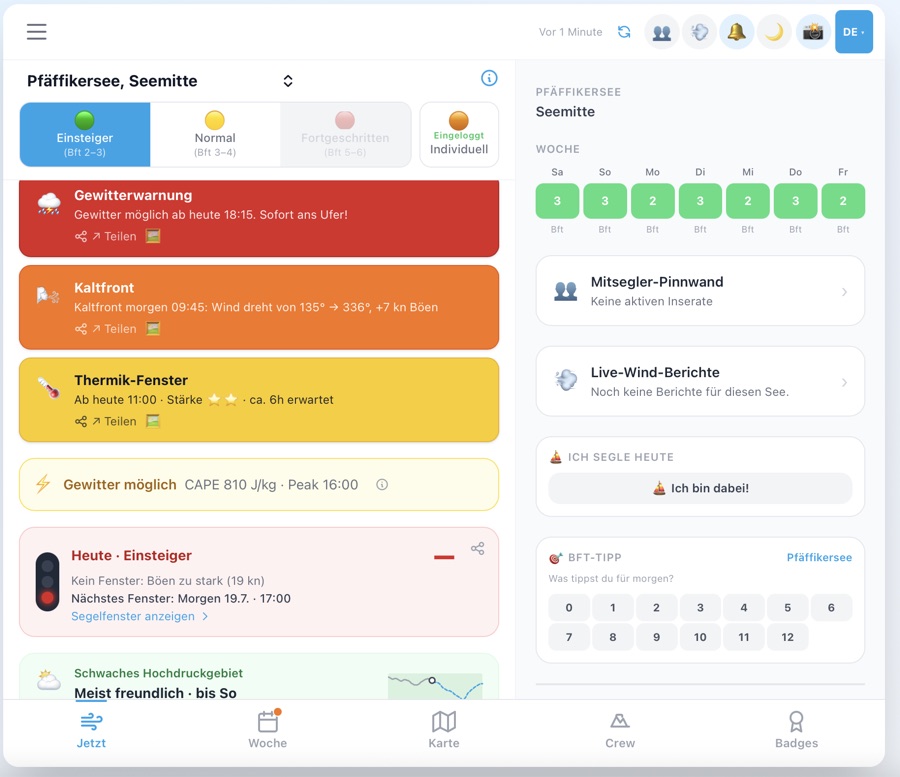
Technisch: WindTab sendet ein
segel_warnings_changed-Event an die App-Shell. Der Streifen sitzt auf z-index: 60 — über dem Tab-Inhalt (z-55), aber unter allen Lock-Modals und Overlays (z-80).
Quand des alertes météo sont actives, une bande colorée s'affiche directement au-dessus de la navigation du bas — visible sur tous les onglets (Carte, Lieux, Community). La couleur dépend de la gravité : 🔴 Rouge · 🟠 Orange · 🟡 Jaune. Appuyez sur la bande pour aller directement dans l'onglet Vent où les alertes sont détaillées. La bande est masquée dans l'onglet Vent lui-même.
When active weather warnings exist, a coloured strip appears directly above the bottom navigation bar — visible on all tabs (Map, Locations, Community). Colour reflects severity: 🔴 Red (storm/severe) · 🟠 Orange (moderate) · 🟡 Yellow (advisory). Tapping the strip jumps directly to the Wind tab where warnings are shown in detail. The strip is hidden on the Wind tab itself since warnings are already visible there.Technical: WindTab broadcasts a
segel_warnings_changed event to the app shell. The strip sits at z-index: 60 — above tab content (z-55), below all lock modals and overlays (z-80).
Kacheln im ausklappbaren Bereich (für neue Nutzer anfangs eingeklappt):
• 🌬️ Wetter & Wind — Segelfenster, 14-Tage-Prognose, 15+ Seen
• ⛵ Ich segle heute — Check-in-Feature: eintragen wenn man segelt, sichtbar für andere auf der Community-Karte
• 🔥 Aktivste Segler — Monatliche Rangliste mit Nickname — Top 50 aufklappbar
• 📲 App installieren · 📖 Anleitung · 🏅 Abzeichen · 🏆 Regatta-Kalender · 📸 Segel Foto
Technisch:
CookieBanner dispatched in beiden Branches (accept() + decline()) das Event segel_cookie_dismissed. App.tsx horcht darauf und setzt showCrewModal = true, sofern der Nutzer das Modal nicht bereits weggeklickt hat (segel_welcome_dismissed in localStorage) und kein Deep-Link vorliegt.
Lors de la première visite, une modale de bienvenue avec l'offre Crew apparaît après la fermeture du bandeau cookies (acceptation ou refus).Tuiles dans la section dépliable:
• 🌬️ Météo & Vent — fenêtres voile, 14 j. prévision, 15+ lacs
• ⛵ Je navigue aujourd'hui — Check-in: te signaler quand tu navigues, visible pour les autres sur la carte
• 🔥 Navigateurs actifs — Classement mensuel avec pseudo — Top 50 dépliable
• 📲 Installer l'app · 📖 Guide · 🏅 Insignes · 🏆 Régattes · 📸 Photo voile
L'événement
segel_cookie_dismissed est émis dans les deux cas par CookieBanner; App.tsx l'écoute et affiche la modale si elle n'a pas déjà été fermée.
On first visit, a welcome modal with the Crew offer appears after the cookie banner is dismissed (accept or decline).Tiles in the expandable section (collapsed for first-time visitors):
• 🌬️ Weather & Wind — sail windows, 14-day forecast, 15+ lakes
• ⛵ I'm Sailing Today — check in when you sail — visible to other sailors on the community map
• 🔥 Most Active Sailors — monthly leaderboard with Nickname — expandable to Top 50
• 📲 Install app · 📖 Guide · 🏅 Badges · 🏆 Regattas · 📸 Sailing photo
CookieBanner dispatches segel_cookie_dismissed in both branches; App.tsx listens and sets showCrewModal = true unless the modal was already dismissed (segel_welcome_dismissed in localStorage) or a deep-link is active.
Technisch:
openSkipperLock(label, id) und openCrewLock(label, id) nehmen jetzt eine Feature-ID entgegen. Die Lock-Sheet-Komponente mappt ID → i18n-Key (vmgDesc, tacticsDesc, etc.) und rendert die Beschreibung in Bernstein-/Sky-Farbe über dem Tier-Preis.
Chaque fonctionnalité verrouillée affiche désormais une courte description de son utilité avant le prix. Exemple pour le calcul VMG : «Angle d'empannage optimal & VMG pour votre type de bateau basé sur des données polaires réelles.»
Each locked feature now shows a short description of what it does before the tier price. Example for the VMG calculator: «Optimal tacking angle & VMG for your boat type based on real polar data.» This helps users immediately assess whether upgrading is worth it.Technical:
openSkipperLock(label, id) and openCrewLock(label, id) now take a feature ID. The lock sheet maps ID → i18n key (vmgDesc, tacticsDesc, etc.) and renders the description in amber/sky colour above the tier price.
1. ⛵ Willkommen — Segel-Foto + Text: Segelfenster, Community, Story Card, Segel-Fotos, Taktik-Planner, Zusatzkarten.
2. 📲 App installieren — iOS: Share → «Zum Home-Bildschirm»; Android: Install-Button; Slide wird ausgeblendet wenn die App bereits installiert ist.
3. 🏆 Abzeichen & Aufstieg — Tier-Progression 🛟→⚓→🚢, Beispiel-Abzeichen.
4. 🌬️ Wind & Segelfenster — Beaufort-Kreise + Woche-Tab-Teaser.
5. 🎁 10 Tage gratis — Feature-Checkliste (Segelfenster, Foto, Story Card, Taktik).
Danach startet automatisch die Feature-Discovery-Tour. Lors de la première ouverture, un carousel 5 slides s'affiche :
1. ⛵ Bienvenue — photo + texte mis à jour
2. 📲 Installer l'app (iOS: Share / Android: install; masqué si déjà installée)
3. 🏆 Insignes & Progression (tiers 🛟→⚓→🚢)
4. 🌬️ Vent & fenêtres
5. 🎁 10 jours gratuits
Le tour de découverte démarre ensuite automatiquement. On first open, a 5-slide carousel appears:
1. ⛵ Welcome — sailing photo + updated copy (sail windows, community, Story Card, photos, tactics)
2. 📲 Install app — iOS Share / Android install; hidden if already installed as PWA
3. 🏆 Badges & levels — tier progression 🛟→⚓→🚢
4. 🌬️ Wind & sail windows — Beaufort circles + Week tab teaser
5. 🎁 10-day free trial — feature checklist
The feature discovery tour then starts automatically.
1. 🌬️ Beaufort-Kreis
2. 📅 Sub-Tab-Leiste — Allgemein / Segelfenster / Segelforecast
3. ☰ Hamburger-Menü — alle Tools
4. 🧭 Footer-Navigation — Jetzt / Woche / Karte / Crew / Abzeichen
Nach Abschluss der Tour erscheint das Willkommen-Modal. Après l'onboarding, 4 tooltips coach-mark guident :
1. 🌬️ Cercle Beaufort
2. 📅 Barre de sous-onglets
3. ☰ Bouton hamburger
4. 🧭 Navigation du bas — Maintenant / Semaine / Carte / Équipage / Insignes
La modale de bienvenue s'affiche après le tour. After onboarding, 4 coach-mark tooltips guide through the key UI elements:
1. 🌬️ Beaufort circle
2. 📅 Sub-tab bar — General / Sail windows / Forecast
3. ☰ Hamburger menu — all tools
4. 🧭 Footer navigation — Now / Week / Map / Crew / Badges
The welcome modal appears after the tour is complete.
Hintergrund: Nebel entsteht, wenn die Luft auf den Taupunkt abkühlt. Eine Differenz unter 2°C bedeutet: Die Luft ist fast gesättigt, schon kleine Abkühlung reicht zur Nebelbildung. Besonders relevant beim Einlaufen in den Hafen am Abend oder bei morgendlichen Ausfahrten.
Quelle: Open-Meteo stündlicher
dew_point_2m-Wert, verglichen mit apparent_temperature je 15-Minuten-Slot.
Quand la différence entre la température de l'air et le point de rosée descend à ≤ 2°C dans les 6 prochaines heures, une bannière 🌁 s'affiche avec la plus petite différence mesurée — signe avant-coureur de brouillard au sol ou de brume lacustre.Principe : Le brouillard se forme quand l'air se refroidit jusqu'au point de rosée. Une différence inférieure à 2°C signifie que l'air est presque saturé — un léger refroidissement suffit à former du brouillard. Particulièrement utile à l'entrée du port le soir ou pour les sorties matinales.
Source : Valeur horaire
dew_point_2m d'Open-Meteo, comparée à apparent_temperature par tranche de 15 minutes.
When the difference between air temperature and dew point drops to ≤ 2°C in the next 6 hours, a 🌁 banner appears with the smallest measured difference — an early warning sign for ground fog or lake mist.Background: Fog forms when air cools to the dew point. A difference below 2°C means the air is nearly saturated — even slight cooling is enough to form fog. Especially relevant when entering harbour in the evening or on morning outings.
Source: Open-Meteo hourly
dew_point_2m value compared with apparent_temperature per 15-minute slot.
Hintergrund: Die Gefrierhöhe (Freezing Level) gibt an, ab welcher Meereshöhe die Temperatur unter 0°C sinkt. Schweizer Seen liegen zwischen 300 m (Zürichsee) und 1800 m (Silvaplaner See). Eine Gefrierhöhe unter 1500 m bedeutet: Bei Nässe kann es schon am Mast und an den Wanten gefrieren.
Quelle: Open-Meteo stündlicher
freezing_level_height-Wert, aktueller Slot.
Quand l'altitude de gel descend sous 1500 m, une bannière ❄️ s'affiche avec la valeur actuelle. Par temps froid et humide à basse altitude de gel, du givre peut se former sur le gréement, les écoutes et les accastillages — particulièrement dangereux en automne et en hiver.Principe : L'altitude de gel indique à partir de quelle hauteur la température passe sous 0°C. Les lacs suisses se trouvent entre 300 m (lac de Zurich) et 1800 m (lac de Silvaplana). Une altitude de gel inférieure à 1500 m signifie que le gel peut atteindre le mât et les haubans en cas d'humidité.
Source : Valeur horaire
freezing_level_height d'Open-Meteo, créneau actuel.
When the freezing level drops below 1500 m, an ❄️ banner appears with the current value. In wet cold weather with low freezing levels, ice can form on the rigging, sheets and fittings — particularly dangerous in autumn and winter.Background: The freezing level indicates the altitude at which temperature drops below 0°C. Swiss lakes lie between 300 m (Lake Zurich) and 1800 m (Lake Silvaplana). A freezing level below 1500 m means ice can form on the mast and shrouds when wet.
Source: Open-Meteo hourly
freezing_level_height value, current slot.
Bedeutung für Segler:
• Unter 40% — Trocken: angenehm, wenig Taubildung
• 40–80% — Normal: komfortabler Bereich
• Über 80% — Feucht: Taubildung wahrscheinlich, Material leidet, kombiniert mit niedrigem Taupunkt auch Nebelgefahr
Quelle: Open-Meteo stündlicher
relative_humidity_2m-Wert, aktueller Slot.
L'humidité relative à 2 m est affichée dans le bloc météo sous forme de barre — avec l'indice UV, la nébulosité et le potentiel thermique.Signification pour les navigateurs :
• Moins de 40% — Sec : agréable, peu de condensation
• 40–80% — Normal : plage de confort
• Plus de 80% — Humide : condensation probable, le matériel souffre, combiné à un point de rosée bas, risque de brouillard
Source : Valeur horaire
relative_humidity_2m d'Open-Meteo, créneau actuel.
Relative humidity at 2 m is shown in the weather block as a bar — alongside UV index, cloud cover and thermic potential.What it means for sailors:
• Below 40% — Dry: pleasant, little dew formation
• 40–80% — Normal: comfortable range
• Above 80% — Humid: dew likely, gear suffers, combined with low dew point also fog risk
Source: Open-Meteo hourly
relative_humidity_2m value, current slot.
⚠️ Böen-Unsicherheit (drei Bedingungen müssen alle erfüllt sein):
1. Böen ÷ Wind ≥ 3× (auffälliges Verhältnis)
2. Böen ≥ 8 kn — verhindert Kalmen-Rauschen (z.B. 0.4 kn Wind / 3.5 kn Böen = 8.8× ist kein echtes Ereignis)
3. Gewitter-Code ≥ 95 im Modell vorhanden — die Warnung ist kontextuell, nicht allgemein
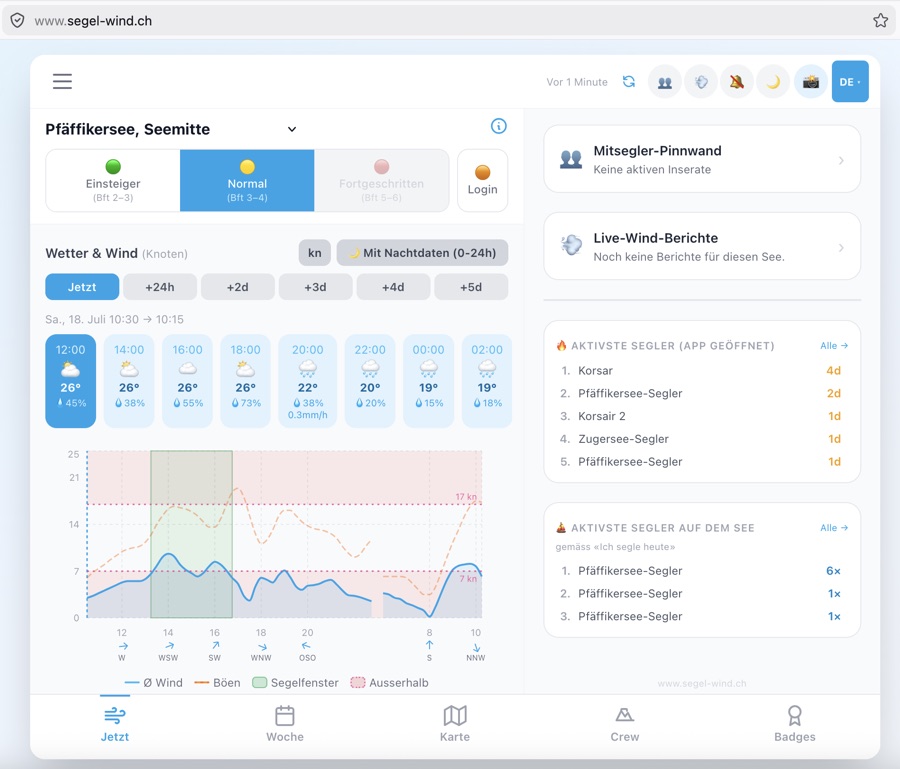
Sind alle drei erfüllt, wird die Böen-Linie abgedunkelt und eine ⚠️-Zeile erscheint. Ein (i)-Icon zeigt die Formel als Tooltip. Force du vent (ligne bleue) avec plage de confiance (bleu clair), rafales et les fenêtres de navigation actuelles (vert). La zone rougeâtre marque les heures hors de la plage choisie. Appuyez sur un point pour les détails.
⚠️ Incertitude des rafales (les trois conditions doivent être remplies) :
1. Rafales ÷ vent ≥ 3× (ratio suspect)
2. Rafales ≥ 8 nœuds — évite le bruit de calme (ex. 0.4 nd vent / 3.5 nd rafales = 8.8× n'est pas un événement réel)
3. Code orage ≥ 95 dans le modèle — l'avertissement est contextuel, pas général
Si les trois sont remplies, la ligne de rafales est atténuée et une ligne ⚠️ apparaît. Une icône (i) affiche la formule en infobulle. Wind speed (blue line) with confidence range (light blue), gusts and the current sailing windows (green). The reddish area marks times outside the chosen range. Tap a data point for details.
⚠️ Gust uncertainty (all three conditions must be met):
1. Gusts ÷ wind ≥ 3× (suspicious ratio)
2. Gusts ≥ 8 kn — prevents calm-day noise (e.g. 0.4 kn wind / 3.5 kn gusts = 8.8× is not a real event)
3. Thunderstorm code ≥ 95 in the model — the indicator is contextual, not general
When all three are met, the gust line dims and a ⚠️ row appears. An (i) icon shows the formula on hover.
Relevant für Segler: Ein stark steigender Pegel nach Starkregen bedeutet engere Vertäuung, weniger Platz am Steg und erhöhte Strömung in Flussnähe.
Normalpegelstand & Abweichung: Jeder See hat einen hinterlegten Referenzpegel (m ü.M.) — entweder der regulierte Zielstand (z.B. Zürichsee: 406.0 m) oder der langjährige Mittelwert (z.B. Pfäffikersee: 536.9 m). Die Karte zeigt die aktuelle Abweichung in cm (positiv = über Normal, negativ = unter Normal). Im Verlaufsgraf ist die Normallinie als goldene gestrichelte Linie eingezeichnet. Tippe auf das ℹ️ für die genaue Quelle und Berechnungsmethode pro See. Niveau actuel du lac en m.s.m. (absolu, station OFEV) avec historique sur 5 jours. La tendance 72h indique si le niveau devrait monter, rester stable ou baisser — basée sur les prévisions de précipitations (Open-Meteo) combinées avec l'évolution actuelle.
Pertinent pour les navigateurs : Une forte hausse du niveau après de fortes pluies signifie un amarrage plus serré, moins d'espace à quai et un courant plus fort près des rivières.
Niveau normal & écart : Chaque lac a un niveau de référence enregistré (m.s.m.) — soit le niveau réglementé (p. ex. lac de Zurich : 406.0 m), soit la moyenne pluriannuelle (p. ex. Pfäffikersee : 536.9 m). La carte affiche l'écart actuel en cm (positif = au-dessus de la normale, négatif = en dessous). Dans le graphique historique, la ligne normale est indiquée en pointillés dorés. Appuyez sur ℹ️ pour obtenir la source et la méthode de calcul précises par lac. Current lake water level in m a.s.l. (absolute, BAFU station) with 5-day history. The 72h outlook shows whether the water level is expected to rise, stay stable or fall — derived from the precipitation forecast (Open-Meteo) combined with the current water level trend.
Relevant for sailors: A sharply rising level after heavy rain means tighter mooring, less space at the jetty and stronger currents near rivers.
Normal level & deviation: Each lake has a stored reference level (m a.s.l.) — either the regulated target level (e.g. Lake Zurich: 406.0 m) or the long-term mean (e.g. Pfäffikersee: 536.9 m). The card shows the current deviation in cm (positive = above normal, negative = below normal). In the history chart the normal line is drawn as a golden dashed line. Tap ℹ️ for the exact source and calculation method per lake.
Regatta-Check (separate Schwelle): Im Regatta-Check gilt eine tiefere Grenze von CAPE > 800 J/kg für das «Gewitterrisiko»-Flag. Grund: Kaltfronten über Schweizer Alpenseen liefern den Auftrieb, der moderates CAPE (800–1500 J/kg) bereits in echte Konvektion umwandelt — bevor der Wettercode überhaupt auf ≥ 95 dreht. Diese konservativere Schwelle ist für die Race-Officer-Entscheidung (Start / Vorsicht / Absagen) bewusst strenger als die allgemeine Warnanzeige.
False-Positive-Prüfung (Gewitterwarnung): Wenn der Wettercode ≥ 95 (Gewitter) erscheint, aber der CAPE-Wert an diesen exakten Stunden unter 300 J/kg liegt, ist die Warnung mit hoher Wahrscheinlichkeit ein Modell-Artefakt. Die Warnung wird automatisch auf Gelb heruntergestuft und ein ❓-Badge zeigt an: «Modell-Unsicherheit — CAPE {n} J/kg (geringe Instabilität)». Zusammen mit der Böen-Unsicherheitserkennung im Diagramm ergibt sich eine konsistente Prüfung auf Plausibilität.
Zeitfenster bei Starkwind-/Sturmwarnungen: Die abgeleiteten Warnungen (Starkwindwarnung Bft 7+, Sturmwarnung Bft 8+) zeigen das von-bis-Fenster — zum Beispiel «Böen bis 31 kn (Bft 7) — 14:30 bis 18:15». Die Uhrzeit wechselt automatisch auf Datum + Zeit wenn das Fenster nicht heute ist (z. B. «Mo 09:00 bis Mo 11:30»). Utilise l'indice CAPE (Convective Available Potential Energy) pour détecter les risques d'orages 6 heures à l'avance. CAPE > 1500 J/kg indique un potentiel orageux. Vous recevez un avertissement Orange (CAPE 1500–2500) ou Rouge (>2500). La bannière CAPE dans l'onglet Vent affiche également l'heure du pic (ex. «CAPE 670 J/kg · max 14:30»). Important pour votre sécurité — les orages se forment souvent plus vite que les avertissements météo traditionnels.
Regatta-Check (seuil distinct) : Dans le Regatta-Check, un seuil plus bas de CAPE > 800 J/kg déclenche le flag «risque d'orage». Raison : les fronts froids sur les lacs alpins suisses fournissent la force d'ascendance qui transforme un CAPE modéré (800–1500 J/kg) en vraie convection avant que le code météo n'atteigne ≥ 95.
Détection des faux positifs (alerte orage) : Si le code météo ≥ 95 (orage) s'affiche mais que la valeur CAPE sur ces heures exactes est inférieure à 300 J/kg, l'alerte est très probablement un artefact de modèle. L'alerte est automatiquement rétrogradée en Jaune et un badge ❓ indique : «Incertitude du modèle — CAPE {n} J/kg (faible instabilité)».
Plage horaire pour les alertes vent fort/tempête : Les alertes dérivées (vent fort Bft 7+, tempête Bft 8+) affichent la plage de début à fin — par ex. «Rafales jusqu'à 31 nœuds (Bft 7) — 14h30 à 18h15». Uses the CAPE index (Convective Available Potential Energy) to detect thunderstorm risks 6 hours in advance. CAPE > 1500 J/kg indicates storm potential. You receive an Orange warning (CAPE 1500–2500) or Red (>2500). The CAPE banner in the Wind tab also shows the time of the peak (e.g. «CAPE 670 J/kg · peak 14:30»). Critical for water safety — thunderstorms form often faster than traditional weather warnings show.
Regatta Check (separate threshold): In the Regatta Check, a lower limit of CAPE > 800 J/kg triggers the «storm risk» flag. Reason: cold fronts over Swiss Alpine lakes provide the lifting mechanism that turns moderate CAPE (800–1500 J/kg) into real convection before the weather code even reaches ≥ 95. This more conservative threshold is intentionally stricter for Race Officer decisions (start / caution / cancel) than the general warning display.
False-positive check (thunderstorm warning): When weathercode ≥ 95 (thunderstorm) appears but the CAPE value at those exact time slots is below 300 J/kg, the warning is very likely a model artefact. The warning is automatically downgraded to Yellow and a ❓ badge shows: "Model uncertainty — CAPE {n} J/kg (low instability)". Together with the gust uncertainty indicator in the chart, this provides consistent plausibility checking.
Time window for strong wind/storm warnings: Derived warnings (strong wind Bft 7+, storm Bft 8+) now show the from–to window — e.g. «Gusts up to 31 kn (Bft 7) — 14:30 to 18:15». The time automatically switches to date + time when the window extends beyond today (e.g. «Mon 09:00 to Mon 11:30»).
Voraussetzung: Benachrichtigungen müssen für mindestens einen See aktiviert sein (Glocke-Symbol im Header oder Einstellungen → Benachrichtigungen). Der Push erscheint maximal einmal pro Woche, unabhängig davon wie oft die App geöffnet wird. Chaque lundi, l'app envoie automatiquement une notification push avec la meilleure fenêtre de navigation de la semaine — si les notifications sont activées pour le lac concerné et qu'une fenêtre avec un score ≥ 70 est trouvée. Le message contient le jour de la semaine, l'heure, le nombre Beaufort et le nom du lac. Vous savez ainsi dès le lundi matin quand il vaut la peine d'aller sur l'eau cette semaine.
Prérequis : Les notifications doivent être activées pour au moins un lac (icône cloche dans l'en-tête ou Paramètres → Notifications). Le push apparaît au maximum une fois par semaine, quel que soit le nombre d'ouvertures de l'app. Every Monday, the app automatically sends a push notification with the best sailing window of the current week — provided notifications are enabled for the relevant lake and a window with score ≥ 70 is found. The message includes the day of the week, time, Beaufort number and lake name. So you know first thing Monday morning when it's worth getting out on the water this week.
Requirement: Notifications must be enabled for at least one lake (bell icon in the header or Settings → Notifications). The push appears at most once per week, regardless of how many times the app is opened.
So verwenden: Wind-Tab → 📱 Story Card-Button → Vorschau öffnet sich → 📤 Teilen (direkt an Instagram / WhatsApp) oder ⬇️ Speichern (JPEG in Galerie). Die Karte wird vollständig im Browser generiert — keine Cloud-Verbindung nötig. Génère une Story Card 1080×1920 pixels (format 9:16, idéal pour les Stories Instagram, les statuts WhatsApp et TikTok) avec fond dégradé nautique, cercle Beaufort coloré, badge BFT, ligne de statut (vert/jaune/rouge), rafales, température ainsi que la date et la signature de l'app.
Utilisation : Onglet Vent → bouton 📱 Story Card → l'aperçu s'ouvre → 📤 Partager (directement vers Instagram / WhatsApp) ou ⬇️ Enregistrer (JPEG dans la galerie). La carte est générée entièrement dans le navigateur — aucune connexion cloud n'est nécessaire. Generates a 1080×1920 pixel Story Card (9:16 format, ideal for Instagram Stories, WhatsApp Status and TikTok) with nautical gradient background, coloured Beaufort circle, BFT badge, status line (green/yellow/red), gusts, temperature plus date and app signature.
How to use: Wind tab → 📱 Story Card button → preview opens → 📤 Share (directly to Instagram / WhatsApp) or ⬇️ Save (JPEG to gallery). The card is generated entirely in the browser — no cloud connection needed.
Manöver-Typen: Wende · Halse · Markrundung · Spinnaker-Set/-Berg
Intervalle: 5 / 8 / 10 / 15 / 20 / 30 / 45 / 60 Sekunden
So verwenden: Wind-Tab → ⏱️ Trainings Timer → Manöver-Typ und Intervall wählen → Start → Gerät in Jackentasche legen: bei jedem Signal vibriert es. Statistik (Anzahl Manöver / Gesamtzeit) wird am Ende angezeigt.
Tier: Ab Mitsegler-Mitgliedschaft. Mitsegler werden → Minuteur d'intervalle avec animation tactile pour l'entraînement aux manœuvres sur l'eau. Émet un signal vibrotactile selon la cadence choisie (5–60 secondes) avec arc de décompte visuel (SVG) et effet flash. Compte les manœuvres et le temps total.
Types de manœuvres : Virement · Empannage · Contournement de bouée · Spinnaker
Intervalles : 5 / 8 / 10 / 15 / 20 / 30 / 45 / 60 secondes
Utilisation : Onglet Vent → ⏱️ Minuteur Entraînement → choisir type de manœuvre et intervalle → Démarrer → mettre l'appareil en poche : il vibre à chaque signal. Les statistiques (nombre de manœuvres / temps total) s'affichent à la fin.
Niveau : À partir du niveau Matelot. Devenir Matelot → Haptic-animated interval timer for manoeuvre training on the water. Gives a vibrotactile signal at the chosen interval (5–60 seconds) with a visual countdown arc (SVG) and flash effect. Counts manoeuvres and total time.
Manoeuvre types: Tack · Gybe · Mark rounding · Spinnaker set/drop
Intervals: 5 / 8 / 10 / 15 / 20 / 30 / 45 / 60 seconds
How to use: Wind tab → ⏱️ Training Timer → choose manoeuvre type and interval → Start → put the device in your pocket: it vibrates at each signal. Statistics (manoeuvre count / total time) are shown at the end.
Tier: From Sailor membership. Join as Sailor →
Pool-Themen (18): Wende · Halse · Q-Wende · Aufschiesser · Indir. Aufschiesser · Manöverkreis · Mann über Bord · Beidrehen · Vor-dem-Wind · Halbwind · Amwind · Raumschots · Spinnaker setzen · Spinnaker bergen · Reffen · Ankern · Segelwechsel · Sternsteuerung
Optionale Felder: Skipper-Name · Trainer-Name · Trainingsboot (erscheinen auf der Karte)
So verwenden: Hamburger-Menü → ⚓ Drill Card generieren → Themen wählen (🎲 Neu generieren oder manuell) → optionale Felder ausfüllen → Vorschau & Exportieren → 💾 Speichern (JPEG) oder 📤 Teilen (WhatsApp/Signal/Instagram).
Tier: Ab Mitsegler-Mitgliedschaft. Mitsegler werden → Génère une Drill Card 1080×1080 pixels (format carré, idéal pour WhatsApp et Instagram) avec jusqu'à 8 thèmes de manœuvres issus d'un pool de 18 manœuvres nautiques classiques, un thème personnalisé optionnel, une bande de vent (cercle Bft, nœuds, direction) et le filigrane de l'app.
Thèmes du pool (18) : Virement · Empannage · Virement rapide · Auloffée · Auloffée indirecte · Cercle de manœuvre · Homme à la mer · Panne · Vent arrière · Vent de travers · Près · Grand largue · Envoi spi · Rentrer spi · Ris · Ancrage · Changement de voile · Pilotage étoile
Champs optionnels : Nom du skipper · Nom du formateur · Bateau d'entraînement (apparaissent sur la carte)
Utilisation : Menu hamburger → ⚓ Générer une Drill Card → choisir les thèmes (🎲 Régénérer ou manuellement) → remplir les champs optionnels → Aperçu & Exporter → 💾 Enregistrer (JPEG) ou 📤 Partager (WhatsApp/Signal/Instagram).
Niveau : À partir du niveau Matelot. Devenir Matelot → Generates a 1080×1080 pixel Drill Card (square format, ideal for WhatsApp and Instagram) with up to 8 manoeuvre themes from a pool of 18 classic sailing manoeuvres, an optional custom theme, wind strip (Bft circle, knots, direction) and app watermark.
Pool themes (18): Tack · Gybe · Q-Tack · Head-to-wind · Indirect luff · Manoeuvre circle · Man overboard · Heave-to · Downwind · Beam reach · Close-hauled · Broad reach · Set spinnaker · Drop spinnaker · Reef · Anchor · Sail change · Star steering
Optional fields: Skipper name · Trainer name · Training boat (appear on the card)
How to use: Hamburger menu → ⚓ Generate Drill Card → choose themes (🎲 Regenerate or manually) → fill optional fields → Preview & Export → 💾 Save (JPEG) or 📤 Share (WhatsApp/Signal/Instagram).
Tier: From Sailor membership. Join as Sailor →
Alarmstufen:
🟡 Steigend: Pegelstand +20 cm in 24h — erhöhte Aufmerksamkeit am Steg
🔴 Hochwasser: Pegelstand +40 cm — Stegbelegung und Mooring prüfen
Voraussetzung: Push-Benachrichtigungen aktiviert (Glocke-Symbol) und Crew-Mitgliedschaft. Der See muss in der App als beobachtet markiert sein. Crew werden → Lorsque le niveau d'un lac surveillé monte fortement (+20 cm en 24h) ou atteint le niveau de crue (+40 cm), l'app envoie automatiquement une notification push — une fois par jour et par lac.
Niveaux d'alerte :
🟡 En hausse : niveau +20 cm en 24h — vigilance accrue au ponton
🔴 Crue : niveau +40 cm — vérifier l'amarrage et la place au ponton
Prérequis : Notifications push activées (icône cloche) et abonnement Crew. Le lac doit être marqué comme observé dans l'app. Devenir Crew → When a watched lake's water level rises sharply (+20 cm in 24h) or reaches flood level (+40 cm), the app automatically sends a push notification — once per day per lake.
Alert levels:
🟡 Rising: level +20 cm in 24h — increased attention at the jetty
🔴 Flood: level +40 cm — check mooring and berth
Requirement: Push notifications enabled (bell icon) and Crew membership. The lake must be marked as watched in the app. Join as Crew →
Inhalt:
📊 Bft-Verteilung: Wie oft du bei welcher Windstärke auf dem Wasser warst
🏆 Meistgesegelte See: Dein Lieblingsrevier im ausgewählten Jahr
🏅 Top 5 Windtage: Deine schönsten Segeltage (nach Wind-Durchschnitt sortiert)
📤 Teilen: Saison-Zusammenfassung per WhatsApp, Signal oder Clipboard
Voraussetzung: Einträge im Törn-Logbuch. Ohne Einträge erscheint ein Hinweis zum Starten des Logbuchs. Affiche un bilan de saison personnel depuis le journal de bord : Top-20 journées venteuses, lac le plus navigué, distribution Bft et un résumé à partager.
Contenu :
📊 Distribution Bft : Combien de fois tu as navigué à chaque force de vent
🏆 Lac le plus fréquenté : Ton terrain de jeu préféré pour l'année sélectionnée
🏅 Top 5 journées venteuses : Tes plus belles sorties (triées par vent moyen)
📤 Partager : Résumé de saison via WhatsApp, Signal ou presse-papiers
Prérequis : Entrées dans le journal de bord. Shows a personal season review from the trip logbook: top 20 wind days, most sailed lake, Bft distribution, and a shareable summary.
Contents:
📊 Bft distribution: How often you were on the water at each wind strength
🏆 Most sailed lake: Your favourite sailing ground for the selected year
🏅 Top 5 wind days: Your best sailing days (sorted by average wind)
📤 Share: Season summary via WhatsApp, Signal or clipboard
Requirement: Entries in the Trip Logbook. Without entries, a prompt to start logging appears.
• Bft-Punkt (farbig, wie der Beaufort-Kreis) + Windrichtung + Standort-Hint
• Böen-Badge (⚡) und «Launisch»-Badge (〰) für besondere Bedingungen
• Altersanzeige (z.B. «vor 8 Min.») — Berichte verblassen nach 20 bzw. 60 Minuten automatisch
• Ø Bft aus allen Berichten + Vergleich mit dem Modell (grün = Abweichung ≤ 1 Bft, gelb = grösser)
Vollmodal (alle Berichte ansehen): Tippe auf «Alle N Berichte →» — dort sind alle aktiven Berichte der letzten 8 Stunden aufgelistet.
Bericht einreichen (nur Mitglieder): Tippe auf «+ Melden» → wähle Bft 0–9, Richtung, Böen/Launisch-Flags, Standort und optionalen Kommentar (max. 100 Zeichen). Berichte laufen nach 8 Stunden automatisch ab. Rate-Limit: max. 2 Berichte pro See pro 8 Stunden.
Grüner Punkt im Tab: Sobald aktuelle Berichte für deinen See vorhanden sind, erscheint ein kleiner grüner Punkt am Wind-Symbol in der unteren Navigation — sichtbar von jedem Tab aus, kein manuelles Nachschauen nötig.
👍 Bericht bestätigen (Upvote): Im vollständigen Berichte-Modal kannst du einzelne Berichte anderer Segler mit einem 👍 bestätigen — ein Klick genügt, kein Konto nötig. Der Upvote-Zähler wird bei jedem Bericht angezeigt und hilft der Community einzuschätzen, welche Berichte besonders zuverlässig sind. Dans l'onglet Vent et dans l'onglet Communauté (sous le tableau d'annonces), une carte compacte «👥 Rapports en direct» affiche les dernières observations de vent de marins sur le lac — signalées directement depuis le bateau :
• Point Bft (coloré, comme le cercle Beaufort) + direction du vent + indice de position
• Badge rafales (⚡) et badge «capricieux» (〰) pour conditions particulières
• Affichage de l'âge (ex. «il y a 8 min») — les rapports s'estompent automatiquement après 20 et 60 minutes
• Bft moyen de tous les rapports + comparaison avec le modèle (vert = écart ≤ 1 Bft, jaune = plus grand)
Modal complet (voir tous les rapports) : appuyer sur «Tous les N rapports →»
Soumettre un rapport (membres uniquement) : appuyer sur «+ Signaler» → choisir Bft 0–9, direction, flags rafales/capricieux, position et commentaire optionnel (max. 100 caractères). Les rapports expirent automatiquement après 8 heures. Limite : max. 2 rapports par lac par 8 heures.
Point vert dans le tab : Dès que des rapports actifs existent pour ton lac, un petit point vert apparaît sur le symbole Vent dans la navigation inférieure — visible depuis n'importe quel onglet.
👍 Confirmer un rapport (upvote) : Dans le modal complet des rapports, tu peux confirmer les rapports d'autres marins avec un 👍 — un clic suffit, sans compte requis. Le compteur d'upvotes est affiché sur chaque rapport et aide la communauté à évaluer lesquels sont particulièrement fiables. In the Wind tab and in the Community tab (below the crew board), a compact card «👥 Live Reports» shows the latest wind observations from sailors on the lake — reported directly from the boat:
• Bft dot (coloured, like the Beaufort circle) + wind direction + location hint
• Gust badge (⚡) and «erratic» badge (〰) for special conditions
• Age display (e.g. «8 min ago») — reports fade automatically after 20 and 60 minutes
• Avg Bft from all reports + comparison with the model (green = deviation ≤ 1 Bft, amber = larger)
Full modal (view all reports): tap «All N reports →»
Submit a report (members only): tap «+ Report» → choose Bft 0–9, direction, gust/erratic flags, location and optional comment (max. 100 chars). Reports expire automatically after 8 hours. Rate limit: max. 2 reports per lake per 8 hours.
Green dot in tab bar: When current reports exist for your lake, a small green dot appears on the Wind tab icon in the bottom navigation — visible from any tab, no manual checking needed.
👍 Confirm a report (upvote): In the full reports modal you can confirm other sailors' reports with a 👍 — one tap, no account needed. The upvote count is shown on each report and helps the community gauge which reports are especially reliable.
• Bft-Wochenübersicht: Ein farbiger Balken pro Tag (Segelsunden 8–20 Uhr) — Grün = Bft 2–4, Gelb = Bft 5, Orange = Bft 6, Rot = Bft 7+
• 👥 Mitsegler-Pinnwand: Aktive Inserate mit Badge und direktem Öffner
• 💨 Live-Windberichte: Berichts-Anzahl mit Badge und direktem Öffner
• 📸 Neuestes Community-Foto: Das aktuellste Foto für den gewählten See — Thumbnail mit Bft-Badge, Caption und «Alle Fotos ansehen»-Link
Zusätzlich erscheint auf dem Desktop ein dezenter Blau-Gradient-Hintergrund, und die App wird als abgehobene Karte mit Schatten und abgerundeten Ecken dargestellt. Sur les grands écrans (bureau, laptop à partir de ≈1024 px), l'onglet Vent affiche automatiquement une sidebar à droite de la vue habituelle :
• Aperçu Bft de la semaine : une barre colorée par jour (heures de navigation 8h–20h) — Vert = Bft 2–4, Jaune = Bft 5, Orange = Bft 6, Rouge = Bft 7+
• 👥 Annonces équipage : annonces actives avec badge et ouverture directe
• 💨 Rapports vent en direct : nombre de rapports avec badge et ouverture directe
• 📸 Dernière photo communauté : la photo la plus récente pour le lac sélectionné — miniature avec badge Bft et lien «Voir toutes les photos»
De plus, un dégradé bleu discret apparaît en arrière-plan et l'app est présentée comme une carte surélevée avec ombre et coins arrondis. On large screens (desktop, laptop from ≈1024 px), the Wind tab automatically shows a sidebar to the right of the usual view:
• Weekly Bft overview: a colour-coded bar per day (sailing hours 8am–8pm) — Green = Bft 2–4, Yellow = Bft 5, Orange = Bft 6, Red = Bft 7+
• 👥 Crew Board: active listings with badge and direct opener
• 💨 Live wind reports: report count with badge and direct opener
• 📸 Latest community photo: the most recent photo for the selected lake — thumbnail with Bft badge and «View all photos» link
Additionally, a subtle blue gradient background appears and the app is presented as a raised card with shadow and rounded corners.
3C · Ankerplatz-Finder 3C · Finder mouillages 3C · Anchor Spot Finder Crew
🟢 Geschützt: Der Platz liegt im Windschatten — ideale Anker-Bedingungen
🟡 Teilweise geschützt: Leichte Wellen möglich — bedingt geeignet
🔴 Exponiert: Platz liegt im Wind — nicht empfehlenswert
Informationen pro Spot: Name · Tiefe (m) · Untergrund (Sand / Schlamm / Fels) · Windrichtungs-Hinweis · Notizen
Verfügbare Seen: Zürichsee · Vierwaldstättersee · Thunersee · Brienzersee · Genfersee · Bodensee · Walensee · Zugersee · Bielersee · Neuenburgersee
Tier: Ab Crew-Mitgliedschaft. Crew werden → Dans l'onglet Carte, un symbole ⚓ apparaît en bas à gauche (Crew+). Une pression affiche tous les mouillages du lac actuellement sélectionné sur la carte — codés par couleur selon l'abri :
🟢 Abrité : Le spot est sous le vent — conditions idéales pour mouiller
🟡 Partiellement abrité : Légères vagues possibles — convient sous conditions
🔴 Exposé : Le spot est au vent — déconseillé
Informations par spot : Nom · Profondeur (m) · Fond (sable / vase / roche) · Indication direction vent · Notes
Lacs disponibles : Lac de Zurich · Lac des Quatre-Cantons · Lac de Thoune · Lac de Brienz · Lac Léman · Lac de Constance · Walensee · Lac de Zoug · Lac de Bienne · Lac de Neuchâtel
Niveau : À partir du niveau Crew. Devenir Crew → In the Map tab, an ⚓ icon appears at the bottom left (Crew+). One tap shows all anchorages for the currently selected lake on the map — colour-coded by shelter status:
🟢 Sheltered: The spot is in the lee — ideal anchoring conditions
🟡 Partially sheltered: Light swell possible — conditionally suitable
🔴 Exposed: The spot is in the wind — not recommended
Info per spot: Name · Depth (m) · Bottom (sand / mud / rock) · Wind direction note · Notes
Available lakes: Lake Zurich · Lake Lucerne · Lake Thun · Lake Brienz · Lake Geneva · Lake Constance · Walensee · Lake Zug · Lake Biel · Lake Neuchâtel
Tier: From Crew membership. Join as Crew →
3B · Skipper-Tools & Taktik 3B · Outils Skipper & tactique 3B · Skipper Tools & Tactics Skipper
🟢 Exzellent (75–100): Perfekt zum Foilen
🔵 Gut (50–74): Gut geeignet
🟡 Fair (25–49): Möglich, aber nicht ideal
🔴 Schlecht (<25): Nicht geeignet Évalue sur une échelle de 0–100 si les conditions actuelles sont adaptées au foiling. Critères: vent 12–20 kn (idéal), rafales <25 kn, variance <30%, visibilité >500m, température >12°C.
🟢 Excellent (75–100): Parfait pour le foil
🔵 Bon (50–74): Bien adapté
🟡 Correct (25–49): Possible, mais pas idéal
🔴 Mauvais (<25): Non adapté Rates on a scale of 0–100 whether current conditions are suitable for foiling. Criteria: wind 12–20 kn (ideal), gusts <25 kn, variance <30%, visibility >500m, temperature >12°C.
🟢 Excellent (75–100): Perfect for foiling
🔵 Good (50–74): Well suited
🟡 Fair (25–49): Possible, but not ideal
🔴 Poor (<25): Not suitable
Zeige die aktuelle Windstärke, wähle dein Boot und sieh sofort:
⬆️ VMG Up — optimale Geschwindigkeit gegen den Wind
⬇️ VMG Down — optimale Geschwindigkeit vor dem Wind
⚙️ Wendewinkel — optimaler Tack-Winkel
⏱️ Zeit pro NM — Dauer für 1 Seemeile
📚 Polar-Quellen: Laser (ILCA) — ILCA Regattadaten, validiert Quantum Sails. Optimist — IODA-Trainingsunterlagen, North Sails. 49er — 49er Class Association VPP. Kielboot — ORC/VPP Referenzwerte (Bavaria/Jeanneau 25–30ft). Katamaran/Foiler — F18/Hobie Cat 16–17. Pirat — Piratenklasse (VDSR/DSV), 420/470-Vergleich. Corsaire Amiguet — SNG-Klassen-Regattadaten (Lac Léman, Zürichsee), Design Roger Amiguet. Melges 24 — Melges 24 Class Association VPP, IRC-Flottentiming Schweizer Seen. Club 55 — IRC-Timing und Klassen-Rating, Romand-Seen. H-Jolle — Segelklub Bodensee / DFJV Messkampagnen. Finn — World Sailing / ISAF Klassen-VPP, Finn Gold Cup Timing. Surprise — Klassen-VPP (SNG), IRC-Flottentiming Schweizer Seen; Design Léon Péronnet. 420 — ISAF Klassenregeln, Quantum Sails 420/470-Vergleich, Schweizer Jugendmeisterschaft. 470 — World Sailing Klassen-VPP, Olympia-Selektionsregatta-Timing. Alle Polaren sind Schweizer-See-Approximationen für taktische Planung — keine offiziellen Klassen-Polaren. Calcule ta Velocity Made Good (vitesse vers l'objectif) basée sur les polaires du bateau. Disponible pour 15 types de bateaux: Laser, Finn, 420, 470, 49er, Optimist, Pirat, H-Jolle, Corsaire Amiguet, Surprise, Melges 24, Club 55, Kielboot, Catamaran, Foiler.
Affiche la force du vent actuelle, choisis ton bateau et vois immédiatement:
⬆️ VMG Up — vitesse optimale contre le vent
⬇️ VMG Down — vitesse optimale vent arrière
⚙️ Angle de bord — angle de bord optimal
⏱️ Temps par NM — durée pour 1 mille nautique
📚 Sources polaires : Laser (ILCA) — données ILCA, Quantum Sails. Optimist — IODA, North Sails. 49er — 49er Class Association VPP. Kielboot — ORC/VPP production. Catamaran/Foiler — F18/Hobie Cat 16–17. Pirat — Piratenklasse (VDSR/DSV). Corsaire Amiguet — régates SNG (Lac Léman, Lac de Zurich), Roger Amiguet. Melges 24 — VPP Melges 24 Class Association, timing IRC lacs suisses. Club 55 — rating et timing IRC lacs romands. H-Jolle — mesures Segelklub Bodensee / DFJV. Finn — World Sailing / ISAF VPP, Finn Gold Cup. Surprise — VPP classe (SNG), timing IRC lacs suisses; design Léon Péronnet. 420 — règles ISAF, comparatif Quantum Sails 420/470, Championnats Suisse Jeunesse. 470 — VPP World Sailing, timing régates sélection olympique. Toutes les polaires sont des approximations pour la planification tactique sur lacs suisses — pas des polaires de classe officielles. Calculates your Velocity Made Good (speed towards goal) based on boat polars. Available for 15 boat types: Laser, Finn, 420, 470, 49er, Optimist, Pirat, H-Jolle, Corsaire Amiguet, Surprise, Melges 24, Club 55, Keelboat, Catamaran, Foiler.
Shows current wind strength, select your boat and instantly see:
⬆️ VMG Up — optimal speed to windward
⬇️ VMG Down — optimal speed downwind
⚙️ Tack angle — optimal tack angle
⏱️ Time per NM — duration for 1 nautical mile
📚 Polar sources: Laser (ILCA) — ILCA regatta data, Quantum Sails. Optimist — IODA training materials, North Sails. 49er — 49er Class Association VPP. Keelboat — ORC/VPP production values (Bavaria/Jeanneau 25–30 ft). Catamaran/Foiler — F18/Hobie Cat 16–17. Pirat — Piratenklasse (VDSR/DSV), 420/470 comparison. Corsaire Amiguet — SNG class regatta data (Lac Léman, Lake Zurich), Roger Amiguet design. Melges 24 — Melges 24 Class Association VPP, IRC fleet timing Swiss lakes. Club 55 — IRC rating and timing, Romand lakes. H-Jolle — Segelklub Bodensee / DFJV measurement campaigns. Finn — World Sailing / ISAF class VPP, Finn Gold Cup timing. Surprise — class VPP (SNG), IRC fleet timing Swiss lakes; design Léon Péronnet. 420 — ISAF class rules, Quantum Sails 420/470 comparison, Swiss Youth Championship. 470 — World Sailing class VPP, Olympic selection regatta timing. All polars are Swiss lake approximations for tactical planning — not official class polars.
A3KP7XNB) — diese ID dient als Primärschlüssel für die Supabase-Cloud-Synchronisation.☁️ Cloud-Sync: Wenn deine ID-Tag gesetzt ist, werden Profile automatisch in der Cloud gespeichert und auf jedem Gerät wiederhergestellt. Im Header siehst du den Sync-Status: ☁️ Sync… | ☁️ ✓ | ☁️ !
📋 ID kopieren: Tippe auf das Kopier-Icon beim Profil um die 8-stellige ID in die Zwischenablage zu kopieren — praktisch für Support-Anfragen oder manuelle Migration. Gérez vos profils de bateau personnels avec nom, poids et polaires individuels. Chaque profil reçoit un ID unique à 8 caractères (ex.
A3KP7XNB) — cet ID sert de clé primaire pour la synchronisation cloud Supabase.☁️ Sync cloud : Lorsque votre ID-Tag est défini, les profils sont automatiquement sauvegardés dans le cloud et restaurés sur chaque appareil. L'état de sync est visible dans l'en-tête : ☁️ Sync… | ☁️ ✓ | ☁️ !
📋 Copier l'ID : Appuyez sur l'icône de copie à côté du profil pour copier l'ID à 8 caractères dans le presse-papiers — pratique pour les demandes de support ou la migration manuelle. Manage your personal boat profiles with individual name, weight and polars. Each profile gets a unique 8-character ID (e.g.
A3KP7XNB) — this ID serves as the primary key for Supabase cloud synchronisation.☁️ Cloud sync: When your ID tag is set, profiles are automatically saved to the cloud and restored on every device. The sync status is visible in the header: ☁️ Sync… | ☁️ ✓ | ☁️ !
📋 Copy ID: Tap the copy icon next to the profile to copy the 8-character ID to the clipboard — handy for support requests or manual migration.
📊 Wind-Richtungs-Diagramm — zeigt die nächsten 3h im LineChart
🔴 Shift-Markierungen — visualisiert Richtungswechsel >3°
⚡ Shift-Liste — detaillierte Auflistung aller erkannten Shifts
📍 Taktik-Empfehlung — «Rechtsshift erwartet: Rechte Seite bevorzugt» etc.
💡 Taktik-Tipps — Hinweise zum Nutzen von Shifts im Rennen Analyse les changements de vent (shifts) des 3 prochaines heures et donne des recommandations tactiques.
📊 Graphique direction du vent — affiche les 3h suivantes dans un LineChart
🔴 Marqueurs de shift — visualise les changements de direction >3°
⚡ Liste des shifts — énumération détaillée de tous les changements détectés
📍 Recommandation tactique — «Changement à droite attendu: côté droit préféré» etc.
💡 Conseils tactiques — conseils pour exploiter les shifts en course Analyzes wind shifts over the next 3 hours and gives tactical recommendations.
📊 Wind direction chart — shows the next 3h in a line chart
🔴 Shift markers — visualizes direction changes >3°
⚡ Shifts list — detailed listing of all detected shifts
📍 Tactical recommendation — "Right shift expected: right side favored" etc.
💡 Tactical tips — hints on using shifts in racing
1. Aktiviere «Layline-Modus» im Karten-Tool
2. Wähle dein Boot (Wendewinkel wird auto-abgeleitet)
3. Klick auf der Karte = Mark setzen
4. Sehe sofort:
🔵 Blau gestrichelt: Beat-Laylinen (aufwinds)
🔴 Rot gestrichelt: Run-Laylinen (abwärts)
🟡 Gelber Marker: Mark-Position Dessine sur la carte les lignes de navigation optimales (laylinen) d'une marque.
1. Activez le «Mode layline» dans l'outil cartographique
2. Sélectionnez votre bateau (l'angle de bord est auto-déduit)
3. Clic sur la carte = placer la marque
4. Voyez immédiatement:
🔵 Bleu pointillé: Laylinen de ceintrage (remontée au vent)
🔴 Rouge pointillé: Laylinen vent arrière (abattée)
🟡 Marqueur jaune: Position de marque Draws on the map the optimal sailing lines (laylines) from a mark.
1. Enable «Layline mode» in the map tool
2. Select your boat (tack angle is auto-deduced)
3. Click on map = place mark
4. Instantly see:
🔵 Blue dashed: Beat laylines (upwind)
🔴 Red dashed: Run laylines (downwind)
🟡 Yellow marker: Mark position
⏱️ Startsequenz:
5 min vor Start: Vorbereitungssignal (1. Schuss)
4 min vor Start: Klassensignal (2. Schuss)
1 min vor Start: Vorwarnsignal (3. Schuss)
0 min: START (4. Schuss)
🔫 Schusssignale: Visueller Flash-Effekt + haptisches Feedback bei jedem Signal.
📤 Teilbar: Generiert eine shareable Karte (JPEG) mit aktuellem Windstatus und «Regatta gestartet»-Meldung — ideal für WhatsApp oder Signal-Gruppen. Chronomètre de compte à rebours précis pour la séquence de départ internationale des régates (5-4-1-0 minutes). Chaque coup de pistolet est affiché visuellement et auditivement. Accessible via la navigation principale (☰ Menu → «🏁 Regatta Countdown») ou directement dans l'onglet Général.
⏱️ Séquence de départ :
5 min avant le départ : signal préparatoire (1er coup)
4 min avant le départ : signal de classe (2e coup)
1 min avant le départ : signal d'avertissement (3e coup)
0 min : DÉPART (4e coup)
🔫 Signaux de départ : Effet flash visuel + retour haptique à chaque signal.
📤 Partageable : Génère une carte partageable (JPEG) avec le vent actuel et «Régate lancée» — idéal pour WhatsApp ou Signal. Precise countdown timer for the international regatta start sequence (5-4-1-0 minutes). Each gun signal is shown visually and with haptic feedback. Accessible via the main navigation (☰ Menu → «🏁 Regatta Countdown») or directly in the General tab.
⏱️ Start sequence:
5 min to start: warning signal (1st gun)
4 min to start: preparatory signal (2nd gun)
1 min to start: one-minute signal (3rd gun)
0 min: START (4th gun)
🔫 Gun signals: Visual flash effect + haptic feedback at each signal.
📤 Shareable: Generates a shareable card (JPEG) with current wind status and «Race started» message — ideal for WhatsApp or Signal groups.
⚙️ Einstellungen:
📅 Regattadatum und Uhrzeit des Starts (frei wählbar, heute bis 7 Tage im Voraus)
🏖️ Seebezeichnung (vorausgefüllt, anpassbar)
📊 Wetteranalyse für den Startzeitpunkt:
💨 Wind (Bft + Knoten + Richtung) und Böen
🌡️ Temperatur, 🌧️ Niederschlagswahrscheinlichkeit, 👁️ Sicht, ⚡ CAPE (Gewitterpotenzial — Gewitterrisiko ab 800 J/kg für Alpine Verhältnisse)
🏁 Entscheidungs-Badge:
✅ Start: Bedingungen sicher und segeltauglich
⚠️ Vorsicht: Grenzwertige Bedingungen — Wettfahrtleiter entscheidet
❌ Absagen: Zu starker Wind, Gewitter, schlechte Sicht oder Sturmrisiko
💨 Windstärke-Regeln (Bft):
🔴 Bft 0 (Windstille, 0 kn): Regatta abgesagt — nicht segelbar
🟡 Bft 1 (1–3 kn): Vorsicht — Wind zu schwach für saubere Wettfahrt
🟢 Bft 2–5 (4–21 kn): Segelbar — kein Windabzug
🟡 Bft 6 (22–27 kn): Vorsicht — starker Wind, Wettfahrtleiter entscheidet
🔴 Bft 7+ (28+ kn): Absagen — zu starker Wind
Faustregel: Bft ≤ 1 gilt als nicht segelbar. Der Score berücksichtigt zudem Böen, Gewitter, Niederschlag und Sicht.
📋 Begründungen: bis zu 4 konkrete Faktoren, die zur Entscheidung geführt haben (z. B. «Böen > Bft 7 — Sicherheitsgrenze überschritten»).
🕐 3-Slot-Vorschau: Wind 2 Stunden vor, beim Start und 2 Stunden nach dem Start — hilft einzuschätzen, ob sich das Wetter verschlechtert oder verbessert.
📤 Teilbar: Generiert eine shareable Karte (JPEG 1080×1350) mit Entscheidung, Wetterdaten, Regattadatum, Countdown und «Generiert am» — ideal für WhatsApp oder SignalGruppen.
📅 Prognose-Verfügbarkeit: Wetterdaten sind bis 7 Tage im Voraus verfügbar. Für weiter entfernte Regatten zeigt die App das genaue Datum an, ab wann die Prognose abrufbar ist. Fournit au directeur de course (Race Officer) une recommandation basée sur les données météo pour décider si une régate doit être lancée, retardée ou annulée. Accessible via la navigation principale (☰ Menu → «🚩 Regatta-Check») ou directement dans l'onglet Général à côté du calculateur VMG et du planificateur tactique.
⚙️ Paramètres :
📅 Date et heure de départ de la régate (librement sélectionnable, aujourd'hui jusqu'à 7 jours à l'avance)
🏖️ Nom du lac (pré-rempli, modifiable)
📊 Analyse météo à l'heure de départ :
💨 Vent (Bft + nœuds + direction) et rafales
🌡️ Température, 🌧️ probabilité de précipitations, 👁️ visibilité, ⚡ CAPE (potentiel orageux — risque d'orage à partir de 800 J/kg en conditions alpines)
🏁 Badge de décision :
✅ Départ : Conditions sûres et navigables
⚠️ Prudence : Conditions limites — le directeur de course décide
❌ Annuler : Vent trop fort, orage, mauvaise visibilité ou risque tempête
💨 Règles de force du vent (Bft) :
🔴 Bft 0 (calme, 0 nœud) : Régate annulée — non navigable
🟡 Bft 1 (1–3 nœuds) : Prudence — vent trop faible pour une régate propre
🟢 Bft 2–5 (4–21 nœuds) : Navigable — aucune pénalité vent
🟡 Bft 6 (22–27 nœuds) : Prudence — vent fort, le directeur de course décide
🔴 Bft 7+ (28+ nœuds) : Annuler — vent trop fort
Règle générale : Bft ≤ 1 = non navigable. Le score tient aussi compte des rafales, des orages, des précipitations et de la visibilité.
📋 Motifs : jusqu'à 4 facteurs concrets ayant conduit à la décision (ex. «Rafales > Bft 7 — limite de sécurité dépassée»).
🕐 Aperçu 3 créneaux : Vent 2 heures avant, au départ et 2 heures après — aide à évaluer si la météo se dégrade ou s'améliore.
📤 Partageable : Génère une carte partageable (JPEG 1080×1350) avec la décision, les données météo, la date de régate, le compte à rebours et «Généré le» — idéal pour WhatsApp ou Signal.
📅 Disponibilité des prévisions : Les données météo sont disponibles jusqu'à 7 jours à l'avance. Pour les régates plus éloignées, l'app affiche la date exacte à partir de laquelle la prévision sera disponible. Gives the Race Officer a data-driven recommendation on whether to start, delay, or cancel a regatta. Accessible via the main navigation (☰ Menu → «🚩 Regatta Check») or directly in the General tab next to the VMG calculator and Tactics Planner.
⚙️ Settings:
📅 Race date and start time (freely selectable, today up to 7 days ahead)
🏖️ Lake name (pre-filled, editable)
📊 Weather analysis at race start time:
💨 Wind (Bft + knots + direction) and gusts
🌡️ Temperature, 🌧️ precipitation probability, 👁️ visibility, ⚡ CAPE (thunderstorm potential — storm risk from 800 J/kg in Alpine conditions)
🏁 Decision badge:
✅ Start: Conditions safe and suitable for sailing
⚠️ Caution: Borderline conditions — Race Officer decides
❌ Cancel: Wind too strong, thunderstorm, poor visibility or storm risk
💨 Wind strength rules (Bft):
🔴 Bft 0 (calm, 0 kn): Race cancelled — not sailable
🟡 Bft 1 (1–3 kn): Caution — wind too light for a clean race
🟢 Bft 2–5 (4–21 kn): Sailable — no wind penalty
🟡 Bft 6 (22–27 kn): Caution — strong wind, Race Officer decides
🔴 Bft 7+ (28+ kn): Cancel — wind too strong
Rule of thumb: Bft ≤ 1 is considered unsailable. The score also accounts for gusts, thunderstorms, precipitation and visibility.
📋 Reasons: Up to 4 specific factors that led to the decision (e.g. "Gusts > Bft 7 — safety limit exceeded").
🕐 3-slot preview: Wind 2 hours before, at start, and 2 hours after — helps assess whether conditions are improving or deteriorating.
📤 Shareable: Generates a shareable card (JPEG 1080×1350) with decision, weather data, race date, countdown and «Generated at» timestamp — ideal for WhatsApp or Signal groups.
📅 Forecast availability: Weather data is available up to 7 days ahead. For more distant races, the app shows the exact date from which the forecast will be available.
SegelfensterFenêtres de navigationSailing windows
Das Segelfenster berechnet automatisch, wann die Windverhältnisse für dein Skill-Level ideal sind — für heute und die nächsten Tage.
La fenêtre de navigation calcule automatiquement quand les conditions de vent sont idéales pour votre niveau — pour aujourd'hui et les prochains jours.
The sailing window automatically calculates when wind conditions are ideal for your skill level — for today and the coming days.
🟡 Normal (Bft 3–4) — Frischer Wind, für die meisten Segler die ideale Bedingung. Nur Crew & Skipper.
🔴 Fortgeschritten (Bft 5–6) — Starker Wind für erfahrene Segler. Nur Crew & Skipper.
🟠 Individuell — Eigene Wind- und Wetterkriterien definieren. Nur Crew & Skipper. 🟢 Débutant (Bft 2–3) — Vent léger à modéré, idéal pour les débutants et les familles. Accessible à tous.
🟡 Normal (Bft 3–4) — Vent frais, conditions idéales pour la plupart des marins. Crew & Skipper uniquement.
🔴 Avancé (Bft 5–6) — Vent fort pour les marins expérimentés. Crew & Skipper uniquement.
🟠 Individuel — Définissez vos propres critères de vent et météo. Crew & Skipper uniquement. 🟢 Beginner (Bft 2–3) — Light to moderate wind, ideal for beginners and families. Free for everyone.
🟡 Normal (Bft 3–4) — Fresh wind, ideal conditions for most sailors. Crew & Skipper only.
🔴 Advanced (Bft 5–6) — Strong wind for experienced sailors. Crew & Skipper only.
🟠 Custom — Define your own wind and weather criteria. Crew & Skipper only.
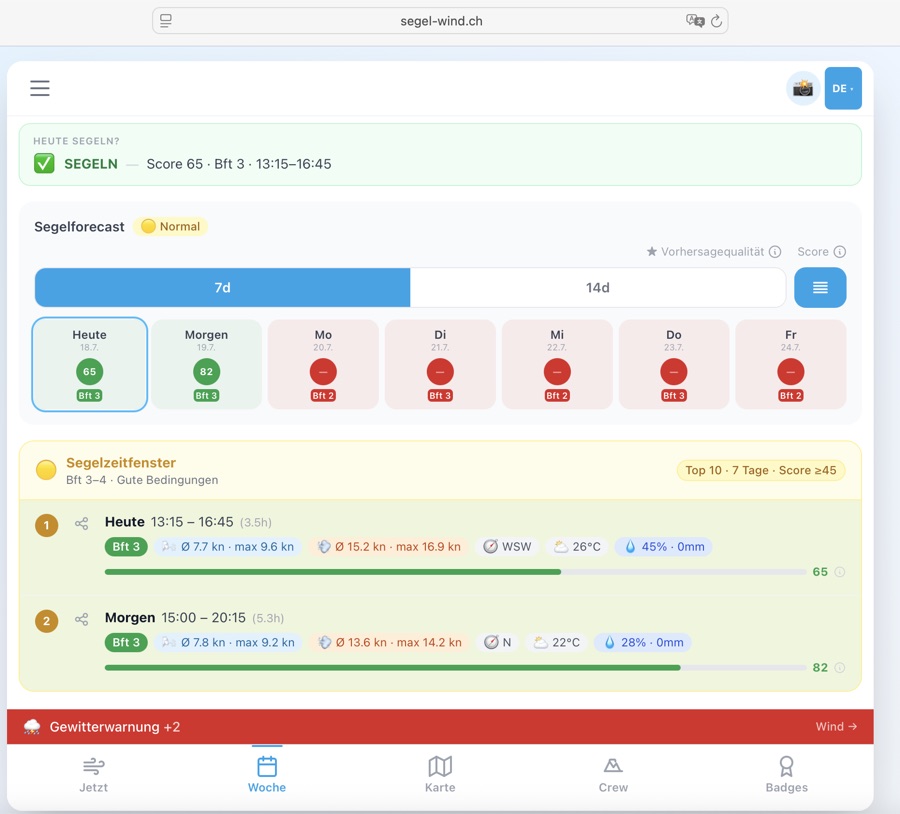
⛵ Segelfenster — Wann lohnt sich der Törn? Die Top-Zeitfenster mit Score.
📋 Segelforecast — 7-Tage-Forecast mit täglicher Übersicht und Segelbewertung. 🌤 Général — Valeurs actuelles, Beaufort, compas, pression, niveau d'eau et tenue recommandée.
⛵ Fenêtre de navigation — Quand vaut-il la peine de sortir ? Meilleurs créneaux avec score.
📋 Prévision navigation — Prévision 7 jours avec aperçu quotidien et évaluation. 🌤 General — Current values, Beaufort, compass, pressure, water level and outfit recommendation.
⛵ Sailing window — When is it worth going out? Top time slots with score.
📋 Sailing forecast — 7-day forecast with daily overview and sailing rating.
Individuelle SegelfensterFenêtres personnaliséesCustom sailing windows
Crew & SkipperKein vorgegebenes Level passt zu deinem Segelstil? Mit dem individuellen Modus definierst du deine eigenen Wind- und Wetterkriterien.
Aucun niveau prédéfini ne correspond à votre style de navigation ? En mode individuel, définissez vos propres critères de vent et météo.
No preset level fits your sailing style? In custom mode you define your own wind and weather criteria.
📊 Max. Böen-Ratio — maximales Verhältnis Böen zu Windmittel.
🌧 Max. Regenwahrscheinlichkeit (%)
🌡 Min. Temperatur (°C)
⏱ Mindestdauer (h)
🎛 Score-Parameter — Böen-Trigger, Böen-Faktor und Kälte-Schwelle. 💥 Max. rafales (kn) — à partir de quand les rafales sont trop fortes ?
📊 Max. ratio rafales — rapport maximum rafales / vent moyen.
🌧 Max. probabilité de pluie (%)
🌡 Min. température (°C)
⏱ Durée min. (h)
🎛 Paramètres de score — déclencheur de rafales, facteur de rafales et seuil de froid. 💥 Max. gusts (kn) — from when are gusts too strong?
📊 Max. gust ratio — maximum ratio of gusts to mean wind.
🌧 Max. rain probability (%)
🌡 Min. temperature (°C)
⏱ Min. duration (h)
🎛 Score parameters — gust trigger, gust factor and cold threshold.
Orte & SeenLieux & lacsLocations & lakes
Der Orte-Tab zeigt alle verfügbaren Standorte auf einem Blick — mit aktueller Windstärke und Richtung.
L'onglet Lieux montre tous les lieux disponibles d'un coup d'œil — avec la force du vent et la direction actuelles.
The Locations tab shows all available spots at a glance — with current wind speed and direction.
KarteCarteMap
Die Karte zeigt alle Standorte auf einer interaktiven Schweizer Karte. Als Crew- oder Skipper-Mitglied kannst du zusätzlich optionale Kartenebenen (Overlays) zuschalten.
La carte affiche tous les sites sur une carte suisse interactive. En tant que membre Crew ou Skipper, vous pouvez activer des calques cartographiques supplémentaires.
The map shows all locations on an interactive Swiss map. As a Crew or Skipper member you can also enable optional map layers (overlays).
7.1 🔵 Standorte-KarteCarte des sitesLocations map
7.2 📍 CommunitykarteCarte communautaireCommunity map
Im Tab «Communitykarte» kannst du Punkte auf dem See einzeichnen und mit anderen teilen — Anker, Regattabojen, Unterwasserhindernisse und mehr.
Dans l'onglet «Carte communautaire», dessinez des points sur le lac et partagez-les — ancres, bouées de régate, obstacles sous-marins et plus.
In the «Community map» tab you can draw points on the lake and share them with others — anchors, regatta buoys, underwater obstacles and more.
7.3 🗺️ Karten-Overlays — Swisstopo TopoCalques de carte — Swisstopo TopoMap overlays — Swisstopo Topo Crew
Über den Button «Karten-Overlays» oben rechts auf der Karte kannst du zusätzliche Kartenebenen einblenden.
Le bouton «Overlays de carte» en haut à droite de la carte permet d'afficher des couches cartographiques supplémentaires.
The «Map overlays» button at the top right of the map lets you enable additional map layers.
7.4 ⛵ Live Törn aufzeichnen & teilenLive Törn enregistrer & partagerLive trip record & share AlleTousAll
• ⛵ Header-Button (oben rechts, immer sichtbar) — direkt antippen
• Hamburger-Menü (☰ oben links) → «⛵ Törn teilen / aufzeichnen»
• Karte → ⛵-Button (rechts unten auf der Karte)
Während ein Törn läuft, zeigt der Header-Button einen grünen Punkt — so weisst du immer, dass die Aufzeichnung aktiv ist. Cette fonctionnalité est gratuite pour tous et peut être ouverte de trois façons :
• Bouton ⛵ dans l'en-tête (en haut à droite, toujours visible) — appuie directement
• Menu hamburger (☰ en haut à gauche) → «⛵ Partager / enregistrer la sortie»
• Carte → bouton ⛵ (en bas à droite de la carte)
Quand une sortie est en cours, le bouton d'en-tête affiche un point vert. Free for everyone, openable in three ways:
• ⛵ header button (top right, always visible) — tap directly
• Hamburger menu (☰ top left) → «⛵ Share / record trip»
• Map → ⛵ button (bottom right on the map)
While a trip is active, the header button shows a green dot.
📡 Standort teilen — Generiert einen Live-Link. Deine Familie öffnet ihn in jedem Browser und sieht deinen ⛵-Marker auf der Karte. Kein App-Download nötig. Dauer: 2 / 4 / 8 Stunden wählbar.
🗺 Route aufzeichnen — Zeichnet deine GPS-Strecke auf. Am Ende erhältst du ein 1080×1080 px Bild mit deiner Route, Distanz in Seemeilen, Dauer, Datum und See-Name — zum Speichern oder Teilen.
⛵ Beides — Live-Link und Route-Aufzeichnung gleichzeitig. Ideal für Solo-Törns: Partner sieht wo du bist, und du hast am Ende dein persönliches Bild. À l'ouverture, tu choisis l'un des trois modes :
📡 Partager position — Génère un lien live. Ton entourage l'ouvre dans n'importe quel navigateur et voit ton marqueur ⛵ sur la carte. Durée : 2 / 4 / 8 heures au choix.
🗺 Enregistrer route — Enregistre ton parcours GPS. À la fin, tu reçois une image 1080×1080 px avec ta route, la distance en milles, la durée, la date et le nom du lac.
⛵ Les deux — Lien live et enregistrement simultanément. Idéal pour les sorties solo. On opening, choose one of three modes:
📡 Share position — Generates a live link. Family opens it in any browser and sees your ⛵ marker on the map. No app download needed. Duration: 2 / 4 / 8 hours.
🗺 Record route — Records your GPS track. At the end you get a 1080×1080 px image with your route, distance in nautical miles, duration, date and lake name.
⛵ Both — Live link and track recording simultaneously. Ideal for solo trips: your partner knows where you are, and you get a personal image at the end.
• ⬇ Karte speichern — Lädt das Bild direkt auf dein Gerät herunter
• ↗ Karte teilen — Öffnet den nativen System-Teilen-Dialog (WhatsApp, Signal, iMessage, Mail …) mit Bild, See-Name, Distanz und Dauer
Das Bild zeigt: Route auf dunklem Hintergrund · Start (grün) und Ziel (rot) markiert · Distanz in Seemeilen · Dauer · Datum · See-Name · segel-wind.ch Branding Après l'arrêt (manuel ou fin de durée), le panneau s'ouvre automatiquement avec deux actions :
• ⬇ Enregistrer la carte — Télécharge l'image directement sur ton appareil
• ↗ Partager la carte — Ouvre le dialogue de partage système (WhatsApp, Signal, iMessage, Mail…) avec l'image, le nom du lac, la distance et la durée
L'image montre : route sur fond sombre · départ (vert) et arrivée (rouge) · distance en milles · durée · date · nom du lac After stopping (manual or timer expiry), the sheet reopens automatically with two actions:
• ⬇ Save map — Downloads the image directly to your device
• ↗ Share map — Opens the native share dialog (WhatsApp, Signal, iMessage, Mail…) with image, lake name, distance and duration
Image shows: route on dark background · start (green) and end (red) marked · distance in nm · duration · date · lake name
1. Öffne die App und gehe zur Karte
2. Dein Törn erscheint automatisch — mit dem blauen Banner «💾 Nicht gespeicherter Törn wiederhergestellt»
3. Du kannst das Bild jetzt noch speichern oder teilen
Die Sicherung ist bis zu 24 Stunden gültig. Danach wird sie automatisch gelöscht. Ta trace GPS est sauvegardée automatiquement toutes les 5 positions. Si l'app se ferme, le navigateur plante ou tu redémarres le téléphone :
1. Ouvre l'app et va à la Carte
2. Ta sortie réapparaît automatiquement — avec la bannière bleue «💾 Sortie non sauvegardée restaurée»
3. Tu peux encore enregistrer ou partager l'image
La sauvegarde est valable 24 heures. Your GPS track is auto-saved every 5 positions locally. If the app closes, the browser crashes or you restart your phone:
1. Open the app and go to the Map
2. Your trip reappears automatically — with the blue banner «💾 Unsaved trip restored»
3. You can still save or share the image
The backup is valid for 24 hours.
«⚓ Kein Fortschritt seit 10 Min. — Legst du an?»
Du kannst dann direkt auf [Stoppen] tippen — oder weitersegeln, wenn du z.B. an einer Boje gewartet hast. Die Warnung verschwindet sobald du dich wieder bewegst. Si ta position GPS bouge de moins de 50 mètres en 10 minutes, une bannière d'alerte jaune apparaît :
«⚓ Aucun mouvement depuis 10 min. — au mouillage?»
Tu peux alors appuyer sur [Stoppen] — ou continuer si tu attendais à une bouée. L'alerte disparaît dès que tu te déplaces à nouveau. If your GPS position moves less than 50 metres in 10 minutes, a yellow warning banner appears:
«⚓ No movement for 10 min — moored?»
Tap [Stop] directly — or keep going if you were waiting at a mark. The warning disappears once you start moving again.
| Auslöser | In-App | Push | Recovery |
|---|---|---|---|
| ⏰ Timer läuft ab | Karte-Bild öffnet | ✅ | — |
| 🛑 Manuell gestoppt | Karte-Bild öffnet | ✅ | — |
| ⚓ Idle >10 min / <50 m | Gelbes Banner | ❌ | — |
| 📱 App / Tab geschlossen | — | ❌ | ✅ nächster Start |
| 💥 App-Absturz | — | ❌ | ✅ nächster Start |
| 📡 Viewer: Link abgelaufen | «Abgelaufen»-Meldung | — | — |
Push-Benachrichtigungen erscheinen auch wenn die App im Hintergrund ist (via Service Worker). Recovery setzt ≥ 3 GPS-Punkte und einen Draft nicht älter als 24 Stunden voraus.
| Déclencheur | In-App | Push | Recovery |
|---|---|---|---|
| ⏰ Minuterie écoulée | Image carte ouvre | ✅ | — |
| 🛑 Arrêt manuel | Image carte ouvre | ✅ | — |
| ⚓ Idle >10 min / <50 m | Bannière jaune | ❌ | — |
| 📱 App / onglet fermé | — | ❌ | ✅ prochain démarrage |
| 💥 Crash app | — | ❌ | ✅ prochain démarrage |
| 📡 Viewer: lien expiré | Message «Expiré» | — | — |
Les notifications push apparaissent même si l'app est en arrière-plan (via Service Worker). La récupération nécessite ≥ 3 points GPS et un brouillon de moins de 24 heures.
| Trigger | In-App | Push | Recovery |
|---|---|---|---|
| ⏰ Timer expires | Map image opens | ✅ | — |
| 🛑 Manually stopped | Map image opens | ✅ | — |
| ⚓ Idle >10 min / <50 m | Yellow banner | ❌ | — |
| 📱 App / tab closed | — | ❌ | ✅ next launch |
| 💥 App crash | — | ❌ | ✅ next launch |
| 📡 Viewer: link expired | «Expired» message | — | — |
Push notifications appear even when the app is in the background (via Service Worker). Recovery requires ≥ 3 GPS points and a draft no older than 24 hours.
• GPS-Genauigkeit — Hohe Genauigkeit aktiviert (enableHighAccuracy). Im Binnenland ±5–15 m
• Position-Updates beim Live-Teilen alle 10 Sekunden
• Datenschutz beim Live-Teilen: Position existiert nur im RAM des Servers, wird nicht gespeichert, Link läuft nach gewählter Zeit ab
• Maximale Aufzeichnungsdauer: 24 Stunden (danach automatischer Stop)
• Mindest-Punkte für Bild: 3 GPS-Punkte — bei GPS-Fehler oder sofortigem Stop kein Bild • Wake Lock — L'écran reste actif tant que l'app est au premier plan — idéal sur un support dans le cockpit
• Précision GPS — Haute précision activée. En intérieur ±5–15 m
• Mises à jour lors du partage live toutes les 10 secondes
• Confidentialité lors du partage live : la position n'est stockée qu'en RAM du serveur, le lien expire après la durée choisie
• Durée maximale d'enregistrement : 24 heures
• Points minimum pour l'image : 3 points GPS • Wake Lock — Screen stays on while app is in foreground — ideal cockpit-mounted
• GPS accuracy — High accuracy enabled. Inland ±5–15 m
• Position updates when live sharing every 10 seconds
• Privacy when live sharing: position is only in server RAM, link expires after chosen time
• Max recording duration: 24 hours (auto-stop after that)
• Minimum points for image: 3 GPS points
7.5 📋 Crew-Briefing-GeneratorGénérateur de briefingCrew briefing generator MitseglerMatelotSailor
📋 Inhalt des Briefings:
🌤 Aktuelle Bedingungen — Wind, Richtung, Böen, Beaufort
🎯 Top 3 beste Segelzeiten — mit Zeiten, Wind, Score (0–100)
☀️ Sun-Times — Sonnenauf/untergang für Planung
📞 Notfall-Info — Wasserschutzpolizei 1414
⏰ Startzeit — Wähle eine beliebige Uhrzeit (z.B. 08:20) oder «Ganzer Tag» für den vollen Tag. Das Zeitfenster wird auch als weiss gestrichelter Rahmen im Winddiagramm markiert.
⏱ Dauer — Filtert das Briefing auf 2 / 3 / 4 / 6 Stunden ab Startzeit (∞ = ganzer Tag).
⬇️ Speichern & Teilen — Download ins Fotoalbum oder WhatsApp/Signal-Share
⏰ Startzeit: Das native Zeitauswahl-Feld öffnet auf allen Geräten (iOS, Android, macOS Safari, Chrome) den System-Picker — direkt antippen und Zeit wählen. Mit Ganztags wird kein Zeitfenster eingeschränkt.
📅 5 Tage: Du kannst heute, morgen oder bis zu 4 Tage im Voraus ein Briefing erstellen — ideal für die Regatta-Planung am Anfang der Woche.
📝 Textlänge: Name, Boot und Skipper sind auf 40 Zeichen begrenzt, Crew-Namen auf 120, Tourenbeschreibung auf 300 Zeichen — so bleibt das Briefing-Bild übersichtlich. Zu langer Text wird im Bild automatisch mit … abgekürzt. Crée un document de briefing professionnel en tant qu'image JPEG pour ton équipage. Idéal pour partager avant les entraînements ou régates.
📋 Contenu du briefing:
🌤 Conditions actuelles — vent, direction, rafales, Beaufort
🎯 Top 3 meilleurs créneaux de navigation — avec horaires, vent, score (0–100)
☀️ Sun-Times — lever/coucher de soleil pour planification
📞 Info urgence — Police sauvetage aquatique 1414
⏰ Heure de début — Choisis n'importe quelle heure (ex. 08:20) ou «Toute la journée» pour la journée complète. La fenêtre temporelle est aussi marquée dans le graphique de vent par un cadre en pointillés blanc.
⏱ Durée — Filtre le briefing sur 2 / 3 / 4 / 6 heures à partir de l'heure de début (∞ = journée entière).
⬇️ Enregistrer & partager — Télécharger dans l'album photo ou partage WhatsApp/Signal
⏰ Heure de départ : Le champ de sélection de l'heure native s'ouvre sur tous les appareils (iOS, Android, macOS Safari, Chrome) — appuyez directement pour choisir l'heure. Avec Toute la journée aucune plage horaire n'est restreinte.
📅 5 jours : Vous pouvez créer un briefing pour aujourd'hui, demain ou jusqu'à 4 jours à l'avance — idéal pour la planification d'une régate en début de semaine.
📝 Longueur du texte : Le nom, le bateau et le skipper sont limités à 40 caractères, les noms d'équipage à 120, la description du tour à 300 caractères — le briefing reste ainsi lisible. Le texte trop long est automatiquement abrégé avec … dans l'image. Creates a professional briefing document as a JPEG image for your crew. Perfect for sharing before training or regattas.
📋 Briefing contents:
🌤 Current conditions — wind, direction, gusts, Beaufort
🎯 Top 3 best sailing times — with times, wind, score (0–100)
☀️ Sun times — sunrise/sunset for planning
📞 Emergency info — water rescue 1414
⏰ Start time — Pick any time (e.g. 08:20) or «All day» for the full day. The time window is also highlighted as a white dashed box in the wind chart.
⏱ Duration — Filters the briefing to 2 / 3 / 4 / 6 hours from the start time (∞ = all day).
⬇️ Save & share — Download to photo album or WhatsApp/Signal share
⏰ Start time: The native time picker opens on all devices (iOS, Android, macOS Safari, Chrome) — just tap to select a time. With All day no time window is applied.
📅 5 days: You can create a briefing for today, tomorrow or up to 4 days ahead — ideal for race planning at the start of the week.
📝 Text length: Name, boat and skipper are limited to 40 characters, crew names to 120, trip description to 300 — keeping the briefing image readable. Text that is too long is automatically abbreviated with … in the image.
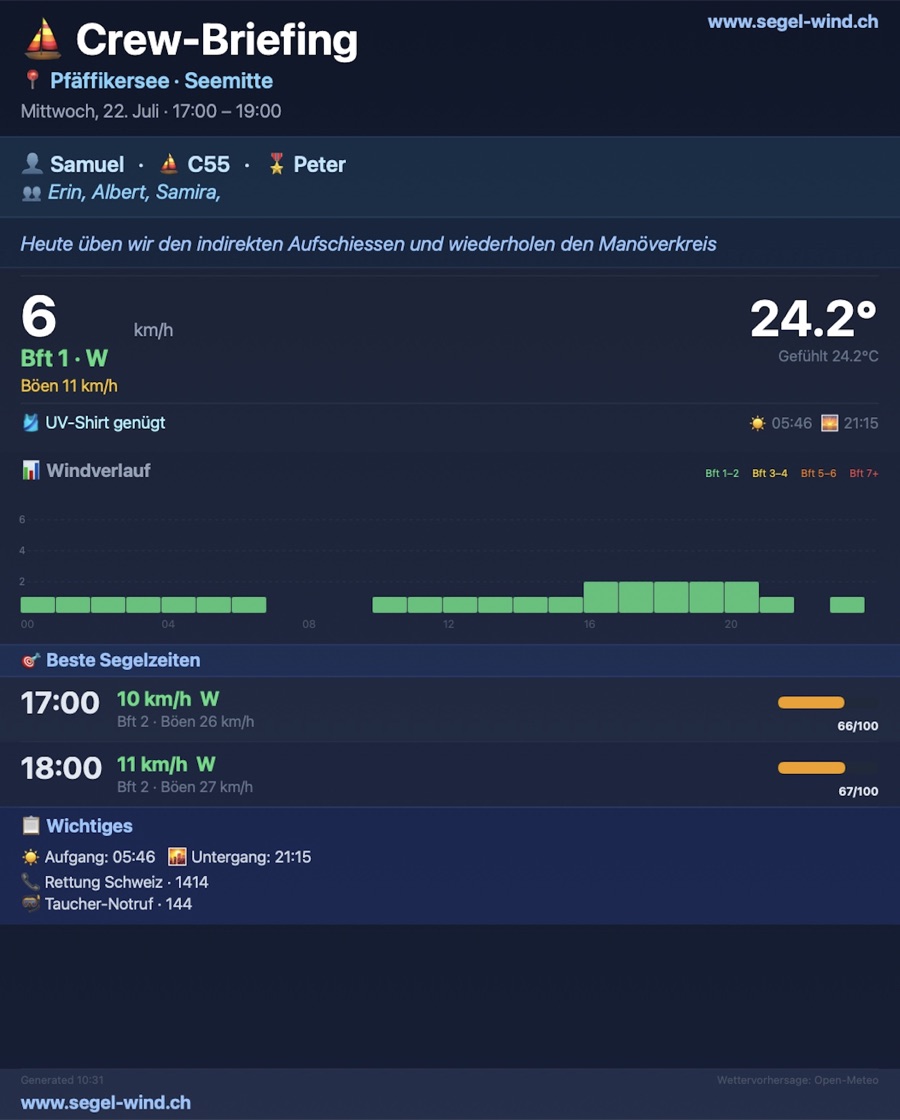
7.6 📓 Törn-LogbuchJournal de bordTrip logbook Mitsegler
| FeldChampField | BeschreibungDescriptionDescription |
|---|---|
| 📅 DatumDateDate | Tag der Ausfahrt (Heute wird vorausgefüllt)Jour de la sortie (aujourd'hui pré-rempli)Day of the outing (today pre-filled) |
| 🏖 SeeLacLake | Auswahl aus allen 20 Schweizer Seen (wird vorausgefüllt)Choix parmi les 20 lacs suisses (pré-rempli)Select from all 20 Swiss lakes (pre-filled) |
| 💨 Wind Ø / MaxVent moy. / MaxWind avg / max | Durchschnitts- und Maximalwind in Knoten (optional)Vent moyen et maximum en nœuds (optionnel)Average and max wind speed in knots (optional) |
| 📝 NotizenNotesNotes | Freitext für Strecke, Besonderheiten, Crew usw. (optional)Texte libre pour le parcours, détails, équipage, etc. (optionnel)Free text for route, highlights, crew etc. (optional) |
Öffnen:Ouvrir :Open: Hamburger-Menü → «📓 Törn-Logbuch» (ab Mitsegler-Tier). Anonym-Nutzer sehen ein Hinweis-Modal mit Link zur Registrierung. Menu hamburger → «📓 Journal de bord» (dès Mitsegler). Les utilisateurs anonymes voient un modal de suggestion avec lien vers l'inscription. Hamburger menu → «📓 Trip logbook» (Mitsegler tier and above). Anonymous users see a hint modal with a link to sign up.
Export:Export :Export: Alle Törns lassen sich mit einem Klick exportieren — über das ⬇️ Export-Icon neben dem Logbuch-Titel. Zwei Formate stehen zur Wahl: Tous les parcours peuvent être exportés d'un clic — via l'icône ⬇️ Export à côté du titre du journal. Deux formats disponibles : All trips can be exported with a single tap — via the ⬇️ Export icon next to the logbook title. Two formats available:
- CSV — Kompatibel mit Excel, Numbers und Google Sheets. Die erste Zeile enthält die Spaltenbezeichnungen (Datum, See, Wind Ø, Wind Max, Notizen).Compatible avec Excel, Numbers et Google Sheets. La première ligne contient les en-têtes de colonnes.Compatible with Excel, Numbers and Google Sheets. The first row contains column headers.
- JSON — Maschinenlesbares Format für Entwickler, Archivierung oder Import in andere Tools.Format lisible par machine pour les développeurs, l'archivage ou l'import dans d'autres outils.Machine-readable format for developers, archiving or importing into other tools.
7.7 ⚓ Nautik-ChartCarte nautiqueNautical chart Skipper
| IconIcôneIcon | BedeutungSignificationMeaning |
|---|---|
| Lila Kreis mit ⚓Cercle violet avec ⚓Purple circle with ⚓ | Hafen / Marina / AnkerplatzPort / Marina / MouillageHarbour / Marina / Anchorage |
| Gelbes DiamantDiamant jauneYellow diamond | Sonderboje / SperrzoneBouée spéciale / Zone interditeSpecial buoy / Exclusion zone |
| Schwarze FahneDrapeau noirBlack flag | Regattaboje / WendemarkeBouée de régate / MarqueRegatta buoy / Mark |
| Grüner Kreis «3»Cercle vert «3»Green circle «3» | Mehrere Objekte (Cluster)Plusieurs objetsMultiple objects (cluster) |
| Blau gestrichelte LinieLigne bleue en tiretsBlue dashed line | Regattakurs / Empf. KursParcours / Route recommandéeRegatta course / Recommended route |
7.8 ⚡ Blitzortung – Echtzeit-BlitzeDétection foudre – Temps réelLightning detection – Real-time Skipper 🚧 Coming Soon
| RichtungDirectionDirection | Abdeckung (~450 km Radius)Couverture (~450 km rayon)Coverage (~450 km radius) |
|---|---|
| SüdSudSouth | Genua / LigurienGênes / LigurieGenoa / Liguria |
| NordNordNorth | Frankfurt / NL-GrenzeFrancfort / frontière NLFrankfurt / NL border |
| WestOuestWest | Lyon / BurgundLyon / BourgogneLyon / Burgundy |
| OstEstEast | Wien / SlowenienVienne / SlovénieVienna / Slovenia |
7.9 🌧️ Regenradar LiveRadar pluie LiveLive rain radar Skipper
7.10 💨 Windfelder-AnimationAnimation champs de ventWind field animation Skipper
7.11 🏊 Badewasserqualität (BAFU)Qualité eau de baignade (OFEV)Bathing water quality (BAFU) Skipper
7.12 🌊 Seegrund-Relief (swissBATHY3D)Relief fond lacustre (swissBATHY3D)Lake floor relief (swissBATHY3D) Skipper
7.13 📡 Echtzeit-MessdatenDonnées temps réelReal-time measurements Skipper
Echtzeit-Messdaten von offiziellen Wetterstationen direkt auf der Karte — Wind, Böen, Temperatur, Luftdruck, Luftfeuchtigkeit und Niederschlag als farbige Pin-Marker.
Données météo en temps réel des stations officielles directement sur la carte — vent, rafales, température, pression, humidité et précipitations sous forme de marqueurs-pin colorés.
Real-time weather data from official stations directly on the map — wind, gusts, temperature, pressure, humidity and precipitation as coloured pin markers.
🔵 Dunkler Farbring = äussere Umrandung, Farbe je nach Windzone (unterscheidet Windpins auf einen Blick von anderen Markern):
• Bft 0 (Flaute): dunkelgrau
• Bft 1–3 (günstig): dunkelgrün
• Bft 4–5 (mässig): dunkelgold
• Bft 6+ (stark): dunkelrot
🎨 Heller Innenkreis = gleiche Windzone in heller: grau / grün / gold / rot
🔢 Zahl im unteren Halbkreis = Beaufort-Wert
↑ Weisser Pfeil im oberen Halbkreis = Herkunftsrichtung des Windes (zeigt woher der Wind kommt) — nur sichtbar wenn Richtungsdaten vorhanden
Antippen für Details: Windgeschwindigkeit in kn, Böen, Himmelsrichtung, Temperatur, Luftdruck, Luftfeuchtigkeit, Niederschlag und Uhrzeit der letzten Messung.
📋 Legende: Die Legende (erscheint automatisch wenn das Overlay aktiv ist) zeigt dieselbe Pin-Form — Kreis mit ↑-Pfeil + Spitze unten — damit du die Farben der Marker auf der Karte sofort einordnen kannst. Forme de pin (cercle en haut + pointe en bas) — indique l'emplacement exact de la station et se distingue ainsi clairement des marqueurs ronds des lieux.
🔵 Anneau coloré foncé = bordure extérieure, couleur selon la zone de vent (distingue les pins de vent des autres marqueurs d'un coup d'œil) :
• Bft 0 (calme) : gris foncé
• Bft 1–3 (favorable) : vert foncé
• Bft 4–5 (modéré) : or foncé
• Bft 6+ (fort) : rouge foncé
🎨 Cercle intérieur clair = même zone en teinte plus claire : gris / vert / or / rouge
🔢 Chiffre dans la moitié inférieure = valeur Beaufort
↑ Flèche blanche dans la moitié supérieure = direction d'où vient le vent — visible uniquement si données de direction disponibles
Appuyez pour les détails : vitesse en nœuds, rafales, point cardinal, température, pression, humidité, précipitations et heure de la dernière mesure.
📋 Légende : La légende (apparaît automatiquement quand le calque est actif) affiche la même forme de pin — cercle avec flèche ↑ + pointe en bas — pour identifier instantanément les couleurs des marqueurs sur la carte. Pin shape (circle on top + point below) — marks the exact station location and is clearly distinct from round location markers.
🔵 Dark colour ring = outer border, colour by wind zone (distinguishes wind pins from other markers at a glance):
• Bft 0 (calm): dark grey
• Bft 1–3 (favourable): dark green
• Bft 4–5 (moderate): dark gold
• Bft 6+ (strong): dark red
🎨 Light inner circle = same wind zone in lighter shade: grey / green / gold / red
🔢 Number in lower semicircle = Beaufort value
↑ White arrow in upper semicircle = direction from which wind is coming — only visible if direction data is available
Tap for details: wind speed in knots, gusts, compass bearing, temperature, pressure, humidity, precipitation and time of last measurement.
📋 Legend: The legend (appears automatically when the overlay is active) shows the same pin shape — circle with ↑ arrow + point below — so you can instantly match legend colours to markers on the map.
AbzeichenInsignesBadges
Abzeichen sind Auszeichnungen, die du für deine Aktivitäten als Segler verdienst. Sie zeigen deine Erfahrung und Community-Zugehörigkeit.
Les insignes sont des distinctions que vous gagnez pour vos activités de marin. Ils montrent votre expérience et votre appartenance à la communauté.
Badges are awards you earn for your activities as a sailor. They show your experience and community membership.
So geht's:
1. Im Crew-Tab → Abzeichen öffnen.
2. Ein noch nicht freigeschaltetes Abzeichen antippen.
3. Auf «Abzeichen holen» klicken.
4. Bestätigung: «Hast du das Abzeichen wirklich erreicht?» — mit Ja bestätigen.
5. Das Abzeichen erscheint sofort mit dem Jahrgang-Medallion (z. B. «26»).
Das Gleiche funktioniert jedes Jahr erneut — jeder Jahrgang wird separat gespeichert.
Wer darf was freischalten?
• Mitsegler: Tiers 4, 5 & 8 (Segeltraining)
• Crew-Member & Skipper: alle Tiers 2–8
Tier-1-Abzeichen (Mitsegler, Crew-Member, Skipper) werden weiterhin vom Admin vergeben. La plupart des insignes (niveaux 2–8) peuvent être débloqués directement dans l'app, sur l'honneur — sans code, sans admin.
Comment faire :
1. Ouvrir l'onglet Équipage → Insignes.
2. Appuyer sur un insigne non encore débloqué.
3. Cliquer sur «Obtenir l'insigne».
4. Confirmer : «Insigne vraiment mérité ?» — valider avec Oui.
5. L'insigne apparaît immédiatement avec la médaille de l'année (ex. «26»).
La même démarche fonctionne chaque année — chaque millésime est sauvegardé séparément.
Qui peut débloquer quoi ?
• Matelot : niveaux 4, 5 & 8 (entraînement voile)
• Crew-Member & Skipper : tous les niveaux 2–8
Les insignes de niveau 1 (Matelot, Crew-Member, Skipper) sont toujours attribués par l'admin. Most badges (tiers 2–8) can be unlocked directly in the app, on your honour — no code, no admin needed.
How it works:
1. Open the Crew tab → Badges.
2. Tap a badge not yet unlocked.
3. Click «Claim badge».
4. Confirm: «Really earned this badge?» — confirm with Yes.
5. The badge appears immediately with the year medallion (e.g. «26»).
The same works every year — each year is stored separately.
Who can unlock what?
• Sailor (Mitsegler): tiers 4, 5 & 8 (sailing training)
• Crew Member & Skipper: all tiers 2–8
Tier-1 badges (Sailor, Crew Member, Skipper) are still assigned by the admin.
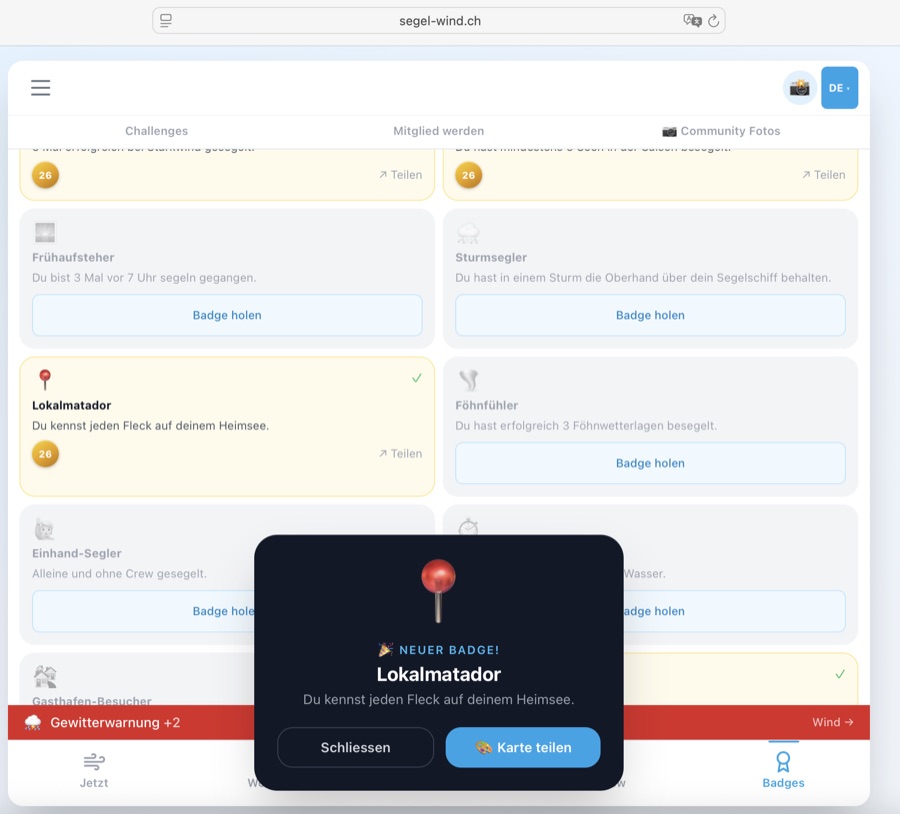
MannschaftsrängeGrades d'équipageCrew ranks
Jede freigeschaltete Abzeichen-Instanz zählt als 1 Punkt. Lade deine Cloud-ID im Abzeichen-Tab, damit alle Abzeichen in die Wertung einfliessen.Chaque insigne débloqué compte comme 1 point. Chargez votre Cloud-ID dans l'onglet Insignes pour que tous les insignes soient pris en compte.Each unlocked badge instance counts as 1 point. Load your Cloud ID in the Badges tab so all badges count towards your rank.
| RangGradeRank | TitelTitreTitle | AbzeichenInsignesBadges |
|---|---|---|
| 🪢 | BackschaftMousseDeckhand | 1–4 |
| ⚓ | LeichtmatroseMatelot légerOrdinary Seaman | 5–10 |
| 🌊 | MatroseMatelotAble Seaman | 11–16 |
| 🔱 | VollmatroseMatelot qualifiéLeading Seaman | 17–21 |
| 🧰 | BootsmannMaître d'équipageBoatswain | 22–29 |
| 🧭 | SteuermannTimonierHelmsman | 30–40 |
| 🗺️ | Erster OffizierPremier officierFirst Mate | 41–53 |
| ⛵ | KapitänCapitaineCaptain | 54–73 |
| 🏴 | KommodoreCommodoreCommodore | 74–99 |
| 🎖️ | AdmiralAmiralAdmiral | 100+ |
Crew Mitglied werdenDevenir membreBecome a member
Segel-Wind CH ist ein Hobby-Projekt ohne Werbung und ohne Venture Capital. Wer die App unterstützen möchte, kann Crew-Mitglied werden — und erhält dafür Abzeichen und weitere Vorteile.
Segel-Wind CH est un projet hobby sans publicité et sans capital-risque. Qui veut soutenir l'app peut devenir membre de l'équipage — et obtient des insignes et d'autres avantages.
Segel-Wind CH is a hobby project with no advertising and no venture capital. Those who want to support the app can become crew members — and receive badges and further benefits.
Du kannst alle Crew-Member-Features 10 Tage lang kostenlos ausprobieren — ohne Konto, ohne E-Mail-Adresse, ohne Kreditkarte.
Tu peux tester toutes les fonctions Crew-Member gratuitement pendant 10 jours — sans compte, sans e-mail, sans carte de crédit.
You can try all Crew Member features free for 10 days — no account, no email address, no credit card.
Ablauf:
Déroulement :
Process:
- Auf segel-wind.ch/crew.html#trial «10 Tage gratis testen» klicken. Cliquer sur «Essai gratuit 10 jours» sur segel-wind.ch/crew.html#trial. Click «Try free for 10 days» at segel-wind.ch/crew.html#trial.
- Du erhältst einen einmalig angezeigten, persönlichen 8-stelligen Code. Un code personnel à 8 chiffres s'affiche une seule fois. You receive a one-time-displayed personal 8-digit code.
- Code kopieren und sichern (er wird nicht erneut angezeigt!). Copier et sauvegarder le code (il ne sera plus affiché !). Copy and save the code (it won't be shown again!).
- In der App: Modus-Auswahl → 🟠 «Login» → Code eingeben → Bestätigen. Dans l'app : sélection de mode → 🟠 «Login» → saisir le code → confirmer. In the app: mode selector → 🟠 «Login» → enter the code → confirm.
- Alle Crew-Member-Features sind sofort aktiv. Im Header siehst du «🎁 noch 10 Tage». Toutes les fonctions Crew-Member sont immédiatement actives. L'en-tête affiche «🎁 encore 10 jour(s)». All Crew Member features are immediately active. The header shows «🎁 10 day(s) left».
Nach Ablauf: Nach 10 Tagen wird der Testcode deaktiviert. Die App zeigt automatisch ein Fullscreen-Overlay mit einer Übersicht der gesperrten Features (Segelfenster, Push-Benachrichtigungen, Wrapped, Briefing) und zwei Optionen: «⚓ Jetzt Crew-Mitglied werden» verlinkt direkt auf die Mitgliedschaftsseite — «Ohne Mitgliedschaft fortfahren» schliesst das Overlay und lässt die App im Basis-Modus weiter nutzen. Der Testcode bleibt im lokalen Speicher erhalten, damit crew.html erkennt, dass bereits ein Code verwendet wurde.
Après expiration : Après 10 jours, le code d'essai est désactivé. L'app affiche automatiquement une superposition plein écran avec un résumé des fonctionnalités verrouillées (fenêtre voile, notifications push, Wrapped, briefing) et deux options : «⚓ Devenir membre» renvoie directement vers la page d'adhésion — «Continuer sans abonnement» ferme la superposition et permet de continuer à utiliser l'app en mode de base. Le code d'essai reste dans le stockage local pour que crew.html reconnaisse qu'un code a déjà été utilisé.
After expiry: After 10 days, the trial code is deactivated. The app automatically shows a full-screen overlay listing the locked features (sailing window, push notifications, Wrapped, briefing) with two options: «⚓ Become a member» links directly to the membership page — «Continue without membership» closes the overlay and lets you keep using the app in basic mode. The trial code stays in local storage so crew.html can recognise that a code has already been used.
Max. 1 Testcode pro IP-Adresse / 30 Tage. Kein Abo, keine automatischen Kosten.
Max. 1 code d'essai par adresse IP / 30 jours. Pas d'abonnement, pas de coûts automatiques.
Max. 1 trial code per IP address / 30 days. No subscription, no automatic charges.
Trial-Hinweis im Wind-Tab: Anonymen Nutzern (ohne Code) erscheint ein 🎁-Banner mit konkretem Inhalt: «10 Tage gratis — Segelfenster, Thermik, Logbuch & mehr». Das Banner erscheint auch wenn aktive Warnungen angezeigt werden — gerade dann ist das Engagement am höchsten. Es kann bis zu 5× geschlossen werden, danach dauerhaft ausgeblendet.
Indication d'essai dans l'onglet Vent : Les utilisateurs anonymes voient un bandeau 🎁 : «10 jours gratuits — fenêtres de nav, thermique, journal & plus». Il s'affiche aussi quand des alertes météo sont actives. Peut être fermé jusqu'à 5 fois.
Trial hint in Wind tab: Anonymous users (without code) see a 🎁 banner: «10 days free — sail windows, thermals, logbook & more». The banner shows even when active warnings are displayed — that's when engagement is highest. It can be dismissed up to 5 times before being permanently hidden.
🎁 Jetzt gratis testen → 🎁 Essai gratuit → 🎁 Try it free →Zugang über das Hamburger-Menü (🤝 Mitsegler-Pinnwand), den 👥-Button oben rechts im Header oder die Teaser-Kachel im Wind-Tab.
Inserat erstellen (nur Mitglieder — Nicht-Mitglieder sehen einen «⛵ Mitglied werden»-Dialog):
• See wählen (20 Schweizer Seen) — oder 📍 GPS-Erkennung tippen, um den nächsten See automatisch zu erkennen
• Datum von/bis, gewünschte Windstärke (Bft min/max)
• Kurze Beschreibung (max. 160 Zeichen) und Kontakt-Hint (max. 80 Zeichen)
• Inserate laufen nach 7 Tagen automatisch ab · Max. 3 aktive Inserate pro id_tag
• Neu aufschalten statt verlängern: Abgelaufene Inserate einfach löschen und neu aufschalten
Eigene Inserate verwalten:
• ↗ Teilen: Inserat direkt per WhatsApp, Signal oder E-Mail weiterleiten
• Löschen: Inserat sofort entfernen
• Countdown zeigt, wie viele Tage das Inserat noch läuft (heute / morgen / N Tage)
Live-Übersicht im Header: Der 👥-Button zeigt einen roten Badge mit der Anzahl aktiver Inserate für den aktuellen See. Der 💨-Button zeigt aktive Live-Windberichte.
Tab-Badges: Die Tabs «Biete Platz» und «Suche Platz» zeigen je einen farbigen Badge mit der Anzahl aktiver Inserate — auf einen Blick sichtbar, wo mehr los ist.
Inserate lesen: Für alle sichtbar, ohne Login. Filtere nach See und Ort, wechsle zwischen den Tabs «Biete Platz» und «Suche Platz». L'annonces équipage est un tableau d'affichage pour les marins : offrir une place ou chercher une place — directement dans l'app, sans plateformes externes.
Accès via le menu hamburger (🤝 Annonces équipage), le bouton 👥 en haut à droite ou la vignette dans l'onglet Vent.
Créer une annonce (membres uniquement — les non-membres voient un dialogue «⛵ Devenir membre») :
• Choisir un lac (20 lacs suisses) — ou appuyer sur 📍 GPS pour détecter le lac le plus proche automatiquement
• Date de/à, force de vent souhaitée (Bft min/max)
• Courte description (max. 160 caractères) et indice de contact (max. 80 caractères)
• Les annonces expirent automatiquement après 7 jours · Max. 3 annonces actives par id_tag
• Republier plutôt que prolonger : supprime une annonce expirée et republier-la avec une nouvelle date
Gérer ses annonces :
• ↗ Partager : transmettre l'annonce directement via WhatsApp, Signal ou e-mail
• Supprimer : retirer l'annonce immédiatement
• Le compte à rebours indique combien de jours l'annonce est encore active
Aperçu en direct dans le header : le bouton 👥 affiche un badge rouge avec le nombre d'annonces actives pour le lac actuel. Le bouton 💨 affiche les rapports de vent en direct.
Badges d'onglets : les onglets «Offre place» et «Cherche place» affichent chacun un badge coloré avec le nombre d'annonces actives — visible d'un coup d'œil.
Lire les annonces : Visible par tous, sans connexion. Filtrer par lac et lieu, basculer entre les onglets «Offre place» et «Cherche place». The crew board is a notice board for sailors: offer a crew place or look for a crew place — directly in the app, without external platforms.
Access via the hamburger menu (🤝 Crew Board), the 👥 button at the top right of the header, or the teaser tile in the Wind tab.
Create a listing (members only — non-members see a «⛵ Become a member» dialog):
• Choose a lake (20 Swiss lakes) — or tap 📍 GPS to detect the nearest lake automatically
• Date from/to, desired wind strength (Bft min/max)
• Short description (max. 160 chars) and contact hint (max. 80 chars)
• Listings expire automatically after 7 days · Max. 3 active listings per id_tag
• Re-post instead of extending: delete an expired listing and post it again with a new date
Manage your listings:
• ↗ Share: forward the listing directly via WhatsApp, Signal or email
• Delete: remove the listing immediately
• Countdown shows how many days the listing has left (today / tomorrow / N days)
Live header overview: the 👥 button shows a red badge with the count of active listings for the current lake. The 💨 button shows active live wind reports.
Tab badges: the «Offering place» and «Looking for place» tabs each show a coloured badge with the count of active listings — visible at a glance.
Read listings: Visible to all, without login. Filter by lake and spot, switch between the «Offering place» and «Looking for place» tabs.
Funktionen:
🌊 See-Filter (Dropdown): Wähle «🌊 Alle Seen» für Fotos aller Schweizer Seen — oder direkt einen See bzw. einen spezifischen Spot aus dem Dropdown.
📤 Foto hochladen (Crew+): Im Community-Tab auf «📷 Foto hochladen» tippen — oder via Hamburger-Menü (☰) → «📷 🔒 Community Foto hochladen» (Crew-Mitglieder). Kamera öffnen → Foto aufnehmen → automatisch mit Wind-Overlay gestempelt → optionale Beschreibung → im Feed veröffentlichen.
❤️ Liken (alle): Fotos anderer Segler liken — kostenlos, ohne Mitgliedschaft. Dein Browser merkt sich, was du bereits geliked hast.
🚩 Melden: Unangemessene Inhalte melden (alle Benutzer)
Wind-Overlay-Stempel: See-Name, Datum/Uhrzeit, Wind in kn, Bft-Kreis (farbcodiert), Temperatur, segel-wind.ch Wasserzeichen.
Tier-Zugriff: Fotos anschauen: Alle · Liken: Alle · Hochladen: Crew+ Dans l'onglet Communauté (📷 Photos communautaires), tous les marins voient les photos actuelles de leurs compagnons. Chaque photo est automatiquement estampillée avec la force du vent, Bft et la température.
Fonctions :
🌊 Filtre lac (liste déroulante) : Choisir «🌊 Tous les lacs» pour voir les photos de tous les lacs suisses — ou sélectionner un lac ou un spot spécifique.
📤 Uploader une photo (Crew+) : Dans l'onglet Communauté, appuyer sur «📷 Télécharger une photo» — ou via le menu hamburger (☰) → «📷 🔒 Télécharger photo communauté» (membres Crew). Ouvrir la caméra → Prendre la photo → Estampillée automatiquement avec l'overlay vent → Description optionnelle → Publier dans le feed.
❤️ Liker (tous) : Liker les photos d'autres marins — gratuitement, sans abonnement. Ton navigateur retient ce que tu as déjà liké.
🚩 Signaler : Signaler un contenu inapproprié (tous les utilisateurs)
Accès par niveau : Voir les photos : Tous · Liker : Tous · Uploader : Crew+ In the Community tab (📷 Community Photos), all sailors see the current lake photos from their fellow sailors. Each photo is automatically stamped with wind strength, Bft and temperature.
Features:
🌊 Lake filter (dropdown): Select «🌊 All Lakes» to browse photos from all Swiss lakes — or pick a specific lake or spot from the dropdown.
📤 Upload photo (Crew+): Tap «📷 Upload photo» in the Community tab — or via the hamburger menu (☰) → «📷 🔒 Upload community photo» (Crew members). Open camera → Take photo → Automatically stamped with wind overlay → Optional caption → Publish to community feed.
❤️ Like (everyone): Like other sailors' photos — free, no membership needed. Your browser remembers what you've already liked.
🚩 Report: Report inappropriate content (all users)
Tier access: View photos: All · Like: All · Upload: Crew+
• Einchecken: «⛵ Ich segle heute» antippen → Zähler erhöht sich sofort
• Auschecken: Nochmals tippen → Zähler verringert sich wieder
• Desktop-Sidebar: Im Wind-Tab direkt einchecken, ohne Tab-Wechsel
• Wind-Tab-Zähler: Wenn mindestens ein Segler eingecheckt ist, erscheint eine kleine Pille («X ⛵ heute») direkt neben dem See-Selektor im Wind-Tab. Tippen öffnet ein Popover mit Zähler und Check-in-Schaltfläche
• ✏️ Nickname: Unterhalb des Titels erscheint ein Nickname-Feld. Tippe auf das ✏️-Symbol, gib deinen Anzeigenamen ein (max. 30 Zeichen) und bestätige mit Enter. Dein Nickname wird in der Monats-Rangliste («Aktivste Segler diesen Monat») für alle Segler sichtbar angezeigt. Leer lassen = anonym bleiben (andere sehen dann «Zürichsee-Segler» o.ä.).
• Verfügbar für: Alle Mitglieder mit Benutzer-Tag — Nicht-Mitglieder sehen einen «⛵ Mitglied werden»-Dialog mit Trial-Option Dans l'onglet Communauté (sous-onglet «🌊 Communauté») ou directement dans la barre latérale desktop (onglet Vent), tu peux signaler que tu navigues aujourd'hui sur le lac. La carte affiche le nombre actuel de marins actifs sur le lac sélectionné — tous les check-ins sont réinitialisés chaque jour.
• Check-in : Appuyer sur «⛵ Je navigue aujourd'hui» → le compteur augmente immédiatement
• Check-out : Appuyer à nouveau → le compteur diminue
• Barre latérale desktop : Check-in directement depuis l'onglet Vent, sans changer d'onglet
• Compteur onglet Vent : Quand au moins un marin est enregistré, une petite pastille («X ⛵ aujourd'hui») apparaît à côté du sélecteur de lac dans l'onglet Vent. Un appui ouvre un popover avec le compteur et le bouton de check-in
• ✏️ Pseudo : Un champ pseudo apparaît sous le titre. Appuie sur ✏️, saisis ton nom d'affichage (max. 30 caractères) et confirme avec Entrée. Ton pseudo sera visible par tous dans le classement mensuel. Laisser vide = rester anonyme.
• Disponible pour : Tous les membres avec un tag utilisateur — les non-membres voient un dialogue «⛵ Devenir membre» avec option d'essai In the Community tab (sub-tab «🌊 Community») or directly in the desktop sidebar (Wind tab), you can signal that you're sailing on the lake today. The card shows the current number of active sailors on the selected lake — all check-ins reset daily.
• Check in: Tap «⛵ I'm sailing today» → counter increases immediately
• Check out: Tap again → counter decreases
• Desktop sidebar: Check in directly from the Wind tab, without switching tabs
• Wind tab counter: When at least one sailor is checked in, a small pill («X ⛵ today») appears next to the lake selector in the Wind tab. Tapping it opens a popover with the count and check-in button
• ✏️ Nickname: A nickname field appears below the title. Tap the ✏️ icon, enter your display name (max. 30 characters) and confirm with Enter. Your nickname is shown publicly in the monthly leaderboard. Leave empty to stay anonymous (others will see «Lake Zurich Sailor» etc.).
• Available to: All members with a user tag — non-members see a «⛵ Become a member» dialog with a trial option
• Tipp abgeben: Bft 0–12 wählen und auf «Tipp abgeben» tippen
• Desktop-Sidebar: Bft 0–12 direkt im Wind-Tab wählen — ohne Tab-Wechsel. Der See-Name erscheint rechts im Karten-Header, damit immer klar ist, für welchen See der Tipp gilt. Hat man für den heutigen Tag bereits abgestimmt, zeigt ein ✅ Dein Tipp: Bft X-Banner prominent über dem Raster an, dass der Tipp gespeichert ist — die Schaltfläche bleibt bis Mitternacht aktiv, falls man den Tipp anpassen möchte
• Community-Verteilung: Nach deinem Tipp siehst du ein Balkendiagramm aller Tipps der Community — mit deinem Tipp hervorgehoben
• Einen Tipp pro Tag: Du kannst deinen Tipp bis Mitternacht anpassen
• Daten gespeichert pro See: Tipps gelten für den aktuell gewählten See
• Auswertung: Am nächsten Tag erscheint eine goldene Ergebnisbox mit dem Tages-Maximum Bft (aus Open-Meteo) und deinem gestrigen Tipp. Bewertung: 🏆 Exakt getroffen · 🎯 Knapp daneben (±1 Bft) · 👍 Nah dran (±2 Bft) · 💨 Daneben. Das Ergebnis wird in der Datenbank (
bft_results) gecacht — spätere Aufrufe des gleichen Sees sind sofort.
Quelle sera la force du vent demain ? Dans l'onglet Communauté (sous-onglet «🌊 Communauté») ou directement dans la barre latérale desktop (onglet Vent), tu peux donner un pronostic Bft pour le lendemain et voir comment les autres marins de ton lac évaluent la situation.• Donner un pronostic : Choisir Bft 0–12 et appuyer sur «Donner mon pronostic»
• Barre latérale desktop : Choisir Bft 0–12 directement depuis l'onglet Vent — sans changer d'onglet. Le nom du lac s'affiche à droite dans l'en-tête de la carte pour toujours savoir pour quel lac le pronostic s'applique. Si tu as déjà voté aujourd'hui, une bannière ✅ Mon pronostic : Bft X s'affiche bien en évidence au-dessus de la grille — le bouton reste actif jusqu'à minuit pour ajuster ton pronostic
• Distribution communauté : Après ton pronostic, un graphique en barres montre tous les pronostics — avec le tien mis en évidence
• Un pronostic par jour : Tu peux ajuster ton pronostic jusqu'à minuit
• Données par lac : Les pronostics s'appliquent au lac actuellement sélectionné
• Résultat : Le lendemain, une boîte dorée affiche le maximum journalier Bft (depuis Open-Meteo) et ton pronostic d'hier. Notation : 🏆 Exactement juste · 🎯 Presque (±1 Bft) · 👍 Proche (±2 Bft) · 💨 Raté. Le résultat est mis en cache dans la table
bft_results.
How strong will the wind be tomorrow? In the Community tab (sub-tab «🌊 Community») or directly in the desktop sidebar (Wind tab), you can place a Bft tip for the next day and see how other sailors on your lake assess the situation.• Place a tip: Choose Bft 0–12 and tap «Place tip»
• Desktop sidebar: Choose Bft 0–12 directly in the Wind tab — without switching tabs. The lake name appears on the right in the card header so it's always clear which lake the tip applies to. If you've already voted today, a prominent ✅ Your tip: Bft X banner is shown above the grid — the button stays active until midnight in case you want to update your tip
• Community distribution: After your tip, a bar chart shows all community tips — with yours highlighted
• One tip per day: You can adjust your tip until midnight
• Per-lake data: Tips apply to the currently selected lake
• Result: The next day, a golden result box shows the daily maximum Bft (from Open-Meteo) and your previous day's tip. Scoring: 🏆 Exactly right · 🎯 Almost there (±1 Bft) · 👍 Close (±2 Bft) · 💨 Missed. Results are cached in the
bft_results table for fast subsequent lookups.
• Streak aufbauen: Öffne die App an aufeinanderfolgenden Tagen — jeder Tag zählt (+1 Streak)
• Monatstabs: «Dieser Monat» zeigt die laufende Rangliste (max. aktuelle Tageszahl), «Letzter Monat» zeigt den abgeschlossenen Monat zum Vergleich
• Top 2 (aufklappbar bis Top 50): Standardmässig werden die zwei führenden Segler angezeigt. «Mehr anzeigen» klappt die vollständige Rangliste bis Rang 50 auf
• Dein Streak: Dein eigener Eintrag ist hervorgehoben — mit deinem Nickname (falls gesetzt) oder «Du»
• Nickname-Anzeige: Segler mit gesetztem Nickname erscheinen mit ihrem Namen. Segler ohne Nickname erscheinen als «[See]-Segler» (z.B. «Zürichsee-Segler») — kein Benutzer-Tag sichtbar. Nickname setzen: im Check-in-Widget oben (✏️-Symbol)
• Automatisch: Der Streak wird beim App-Start automatisch synchronisiert
• Realistisches Maximum: Streaks über 1825 Tage (~5 Jahre) werden nicht gewertet
• 🎉 Streak-Meilensteine Teilen (3 / 10 / 20 / 50 / 100 Tage): Beim Erreichen eines Meilensteins erscheint ein Konfetti-Modal mit der Meilenstein-Bezeichnung (🌱 Erste Schritte · ⛵ Segler · 💫 Aktiver Segler · 🏅 Stammsegler · 🔥 Segler-Legende). Tippe auf «📸 Teilen», um eine 1080×1080-Karte mit Feuer-Design zu generieren und via System-Share (oder Download) zu teilen. Jeder Meilenstein wird nur einmal angezeigt — danach automatisch als gesehen markiert Le classement de série dans l'onglet Communauté affiche les marins les plus actifs — sélectionnable pour «Ce mois» ou «Mois dernier» — classés selon le nombre de jours consécutifs d'ouverture de l'app. Lors des jalons, une modale avec confettis et bouton de partage s'affiche.
• Construire sa série : Ouvre l'app des jours consécutifs — chaque jour compte (+1 série)
• Onglets mensuels : «Ce mois» affiche le classement en cours (max. jour actuel), «Mois dernier» affiche le mois terminé pour comparaison
• Top 2 (extensible jusqu'au Top 50) : Par défaut, les deux premiers marins sont affichés. «Voir plus» affiche le classement complet jusqu'au rang 50
• Ta série : Ton propre entrée est mise en évidence — avec ton pseudo (si défini) ou «Toi»
• Affichage du pseudo : Les marins avec un pseudo sont affichés avec leur nom. Sans pseudo, ils apparaissent comme «Voilier · [lac]». Définir un pseudo : dans le widget de check-in (icône ✏️)
• Automatique : La série est synchronisée automatiquement au démarrage de l'app
• Maximum réaliste : Les séries supérieures à 1825 jours (~5 ans) ne sont pas comptabilisées
• 🎉 Jalons de série à partager (3 / 10 / 20 / 50 / 100 jours) : Quand un jalon est atteint, une modale avec confettis affiche le titre du jalon (🌱 Premiers pas · ⛵ Voilier · 💫 Voilier actif · 🏅 Voilier fidèle · 🔥 Légende du bord). Appuie sur «📸 Partager» pour générer une carte 1080×1080 et la partager. Chaque jalon n'est affiché qu'une seule fois The streak leaderboard in the Community tab shows the most active sailors — selectable for «This Month» or «Last Month» — ranked by the number of consecutive days with app opens. At milestones, a confetti modal with a share button appears.
• Build your streak: Open the app on consecutive days — every day counts (+1 streak)
• Month tabs: «This Month» shows the current leaderboard (capped at today's date), «Last Month» shows the completed month for comparison
• Top 2 (expandable to Top 50): By default, the two leading sailors are shown. «Show more» expands the full leaderboard up to rank 50
• Your streak: Your own entry is highlighted — with your nickname (if set) or «You»
• Nickname display: Sailors with a nickname are shown by their chosen name. Without a nickname they appear as «[Lake] Sailor». Set a nickname in the check-in widget above (✏️ icon)
• Automatic: Your streak is automatically synced at app start
• Realistic maximum: Streaks above 1825 days (~5 years) are not counted
• 🎉 Share streak milestones (3 / 10 / 20 / 50 / 100 days): When a milestone is reached, a confetti modal shows the milestone title (🌱 First steps · ⛵ Sailor · 💫 Active sailor · 🏅 Regular sailor · 🔥 Sailing legend). Tap «📸 Share» to generate a 1080×1080 card and share via system share (or download). Each milestone is shown only once — then automatically marked as seen
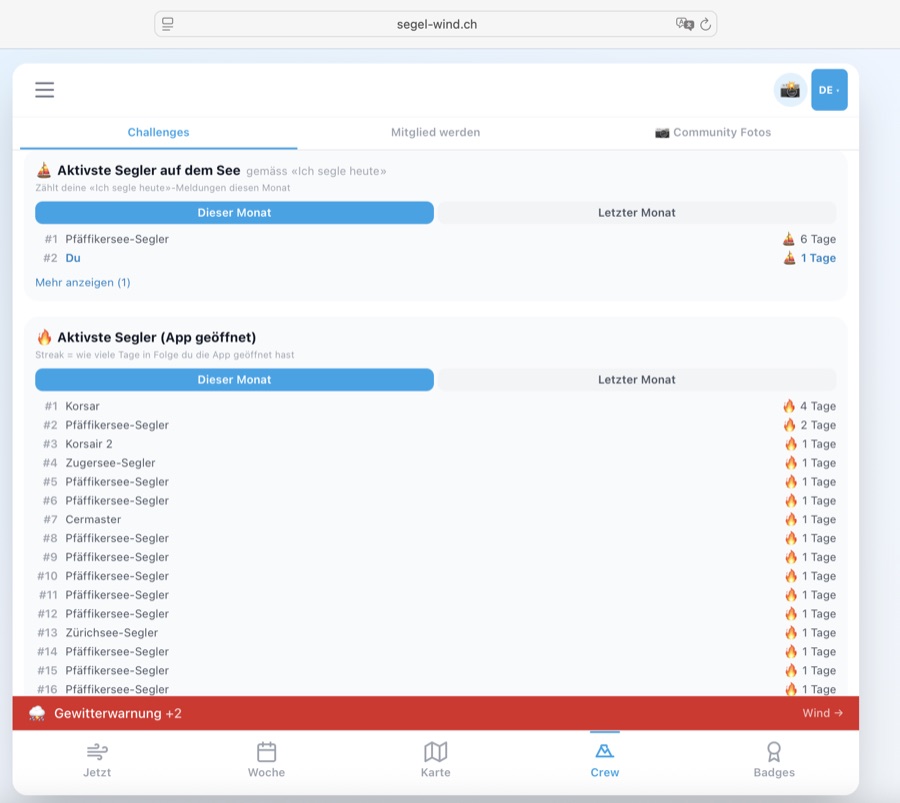
Bezahlung unkompliziert über Stripe (Karte, TWINT u. a.). Alle Details auf segel-wind.ch/crew.html. Paiement simple via Stripe (carte, TWINT, etc.). Tous les détails sur segel-wind.ch/crew.html. Easy payment via Stripe (card, TWINT & more). Full details at segel-wind.ch/crew.html.
Segel-FotoPhoto voileSailing Photo
AlleTousAll→ Segel-Foto öffnenOuvrir Photo voileOpen Sailing Photo
10.1 Foto erstellenCréer une photoCreate a photo
- Standort wählen — See und Ort aus dem Dropdown auswählen. Die Wetterdaten werden automatisch geladen.Choisir le lieu — sélectionner le lac et le lieu dans le menu déroulant. Les données météo se chargent automatiquement.Choose location — select lake and spot from the dropdown. Weather data loads automatically.
- Foto auswählen — JPG oder PNG von der Kamera oder Galerie. Die Seite scrollt automatisch zur Vorschau (Schritt 3).Choisir une photo — JPG ou PNG depuis l'appareil ou la galerie. La page défile automatiquement vers l'aperçu (étape 3).Choose photo — JPG or PNG from camera or gallery. The page automatically scrolls to the preview (step 3).
- Stil auswählen — Dark, Hell oder Minimal (siehe unten).Choisir le style — Sombre, Clair ou Minimal (voir ci-dessous).Choose style — Dark, Light or Minimal (see below).
- Speichern oder Teilen — direkt auf das Gerät oder per Share-Funktion.Enregistrer ou partager — directement sur l'appareil ou via la fonction de partage.Save or share — directly to device or via the share function.
💡 Tipp: Datum und Uhrzeit werden automatisch aus den Foto-Metadaten (EXIF) ausgelesen — so stimmen die Wetterdaten genau mit dem Aufnahmezeitpunkt überein.💡 Conseil : La date et l'heure sont lues automatiquement depuis les métadonnées EXIF — les données météo correspondent exactement au moment de la prise de vue.💡 Tip: Date and time are automatically read from the photo's EXIF metadata — weather data matches the exact moment the photo was taken.
10.2 Stile & SprachenStyles & languesStyles & languages
| 🌙 DunkelSombreDark | Dunkler Verlauf am unteren Bildrand, weisse Schrift. Ideal für Fotos mit hellem Himmel.Dégradé sombre en bas de l'image, texte blanc. Idéal pour les photos avec un ciel lumineux.Dark gradient at the bottom, white text. Ideal for photos with a bright sky. |
| ☀️ HellClairLight | Weisser Verlauf am unteren Bildrand, dunkle Schrift — das Foto bleibt durch den Gradienten sichtbar. Für dunkle oder kontrastreiche Fotos.Dégradé blanc en bas de l'image, texte sombre — la photo reste visible grâce au dégradé. Pour les photos sombres ou à fort contraste.White gradient at the bottom, dark text — the photo stays visible through the fade. For dark or high-contrast photos. |
| ◻ Minimal | Kleines dunkles Pill-Badge — minimaler Eingriff ins Foto, nur Kerndaten.Petit badge sombre — intervention minimale sur la photo, données essentielles uniquement.Small dark pill badge — minimal intrusion, core data only. |
Die Overlay-Sprache folgt der gewählten App-Sprache (DE / FR / EN) — der Seename wird automatisch übersetzt.
La langue de l'overlay suit la langue de l'app sélectionnée (DE / FR / EN) — le nom du lac est traduit automatiquement.
The overlay language follows the selected app language (DE / FR / EN) — the lake name is translated automatically.
10.3 Speichern & TeilenEnregistrer & partagerSave & share
FAQ
Häufig gestellte Fragen zur Segel-Wind CH App.
Questions fréquentes sur l'app Segel-Wind CH.
Frequently asked questions about the Segel-Wind CH app.
🌬 Segler & Wassersportler — Wer morgens wissen will, ob sich der Törn lohnt, findet hier Winddaten, Segelfenster und Forecast für 66 Standorte auf Schweizer Seen.
⚓ Segelclubs — Exklusive Club-Abzeichen als Incentive für Engagement. Interesse? info@segel-wind.ch.
🤝 Partner & Sponsoren — Segelschulen, Ausrüster und lokale Marken können mit Logo auf www.segel-wind.ch präsent sein. En bref : pour tous ceux qui aiment naviguer — et en veulent un peu plus que de simples données météo.
🌬 Marins & sports nautiques — Qui veut savoir si la sortie vaut la peine trouve ici des données de vent, des fenêtres de navigation et des prévisions pour 66 lieux sur les lacs suisses.
⚓ Clubs de voile — Insignes exclusifs comme incentive pour l'engagement. Intéressé ? info@segel-wind.ch.
🤝 Partenaires & sponsors — Écoles de voile, équipementiers et marques locales peuvent être présents avec logo sur www.segel-wind.ch. In short: for everyone who loves sailing — and wants a little more than just weather data.
🌬 Sailors & water sports enthusiasts — Anyone wanting to know if the outing is worth it finds wind data, sailing windows and forecasts for 66 locations on Swiss lakes.
⚓ Sailing clubs — Exclusive club badges as an incentive for engagement. Interested? info@segel-wind.ch.
🤝 Partners & sponsors — Sailing schools, equipment suppliers and local brands can be present with a logo on www.segel-wind.ch.
Ein Gönner-Beitrag ist einmalig, frei wählbar — einfach per Stripe (Karten, Apple Pay, Google Pay, Twint u. a.), was dir die App wert ist.
Ein grosses Dankeschön an alle, die bereits gespendet haben. 🙏⛵ Segel-Wind CH n'est pas une startup avec capital-risque — c'est un projet hobby. Les donateurs sont un soutien important pour les nouvelles fonctionnalités.
Une contribution de donateur est unique, librement choisie — simplement par Stripe (cartes, Apple Pay, Google Pay, Twint et autres), ce que l'app vaut pour vous.
Un grand merci à tous ceux qui ont déjà donné. 🙏⛵ Segel-Wind CH is not a venture-backed startup — it is a hobby project. Supporters are an important pillar for new features and ongoing operations.
A supporter contribution is one-time, freely chosen — simply via Stripe (cards, Apple Pay, Google Pay, Twint and more), whatever the app is worth to you.
A heartfelt thank you to everyone who has already donated. 🙏⛵
Die App analysiert stündliche Winddaten und sucht nach zusammenhängenden Zeitblöcken, in denen alle Kriterien des gewählten Levels gleichzeitig erfüllt sind.
L'app analyse les données de vent horaires et cherche des blocs de temps continus où tous les critères du niveau choisi sont simultanément remplis.
The app analyses hourly wind data and looks for continuous time blocks where all criteria of the chosen level are met simultaneously.
Kriterien pro LevelCritères par niveauCriteria per level
| Level | Wind (Bft)Vent (Bft)Wind (Bft) | Max. BöenMax. rafalesMax. gusts | Max. Ratio |
|---|---|---|---|
| 🟢 EinsteigerDébutantBeginner | 2–3 | 15 kn | 2.0 |
| 🟡 Normal | 3–4 | 25 kn | 2.5 |
| 🔴 FortgeschrittenAvancéAdvanced | 5–6 | 35 kn | 2.5 |
Böen-Ratio = Böen ÷ Mittlerer Wind. Beide Böen-Kriterien müssen erfüllt sein.Ratio rafales = Rafales ÷ Vent moyen. Les deux critères de rafales doivent être remplis.Gust ratio = Gusts ÷ Mean wind. Both gust criteria must be met.
Jedes Fenster erhält anschliessend einen Score (0–100). Fenster mit Score > 45 erscheinen in der Top-10-Liste.Chaque fenêtre reçoit ensuite un score (0–100). Les fenêtres avec score > 45 apparaissent dans la liste Top 10.Each window then receives a score (0–100). Windows with score > 45 appear in the Top-10 list.
Score-Formel (Start: 100)Formule de score (début : 100)Score formula (start: 100)
| 💨 BöenRafalesGusts | − (gust_kn − wind_kn × trigger) × factor |
| 🌧 RegenPluieRain | − (max(0, rain% − 15) / 45)² × 36 |
| 💨 Wind-IdealVent idéalWind ideal | − |Bft − idealBft| × 8 |
| 🌡 KälteFroidCold | − max(0, (threshold − °C) × 1.5) |
🏅 Abzeichen verdienen — für Segeltage, Standorte und Community-Engagement.
📍 Orte teilen — trag einen Ankerplatz oder Geheimtipp auf der Karte ein.
⚓ Crew Mitglied werden — schalte exklusive Abzeichen frei und steig in den Tiers auf. Collectez des insignes, découvrez les lacs, rejoignez la communauté.
🏅 Gagner des insignes — pour les jours de navigation, les lieux et l'engagement communautaire.
📍 Partager des lieux — ajoutez un mouillage ou un bon plan sur la carte.
⚓ Devenir membre — débloquez des insignes exclusifs et progressez dans les niveaux. Collect badges, discover the lakes, become part of the community.
🏅 Earn badges — for sailing days, locations and community engagement.
📍 Share locations — add an anchorage or insider tip to the map.
⚓ Become a crew member — unlock exclusive badges and climb the tiers.
Abzeichen selbst freischalten («Abzeichen holen»-Button): Mitsegler (Tiers 4, 5 & 8), Crew-Members und Skipper (alle Tiers 2–8) können Abzeichen auf Ehrenbasis selbst freischalten — direkt in der App:
1. Crew-Tab → «Meine Abzeichen» öffnen.
2. Das gewünschte Abzeichen antippen.
3. «Abzeichen holen» antippen.
4. Bestätigung «✅ Ja, ich hab's erreicht» wählen.
5. Das Abzeichen erscheint sofort mit Jahrgangs-Medallion (z. B. 2026).
Tier-1-Abzeichen (z. B. Mitsegler, Crew-Member, Skipper) werden weiterhin vom Admin freigeschaltet. Les insignes s'affichent dans l'onglet Crew sous «Mes insignes». Avec l'ID cloud, restaurez vos insignes sur un nouvel appareil.
Débloquer un insigne soi-même (bouton «Obtenir l'insigne») : Les Matelots (niveaux 4, 5 & 8), Crew-Members et Skippers (tous les niveaux 2–8) peuvent débloquer les insignes sur l'honneur directement dans l'app :
1. Onglet Crew → ouvrir «Mes insignes».
2. Appuyer sur l'insigne souhaité.
3. Appuyer sur «Obtenir l'insigne».
4. Confirmer «✅ Oui, je l'ai accompli».
5. L'insigne apparaît immédiatement avec une médaille annuelle (ex. 2026).
Les insignes de niveau 1 (ex. Matelot, Crew-Member, Skipper) restent débloqués par l'administrateur. Badges are displayed in the Crew tab under «My badges». Use the Cloud ID to restore your badges on a new device.
Self-unlock a badge («Claim badge» button): Sailors (tiers 4, 5 & 8), Crew Members and Skippers (all tiers 2–8) can claim badges on the honour system, directly in the app:
1. Crew tab → open «My badges».
2. Tap the desired badge.
3. Tap «Claim badge».
4. Confirm «✅ Yes, I've achieved it».
5. The badge appears immediately with a year medallion (e.g. 2026).
Tier-1 badges (e.g. Sailor, Crew Member, Skipper) continue to be unlocked by the admin.
Regatten-KalenderCalendrier des régattesRegatta Calendar
NeuNouveauNewDer Regatten-Kalender zeigt alle grossen Schweizer Regatten 2026 auf einen Blick — mit direkter Wettervorhersage für den Renntag. Für Regatten innerhalb der nächsten 15 Tage wird automatisch Wind, Bft und eine Segelampel (Ideal / Gut / Mässig / Risiko) angezeigt. Für weiter entfernte Regatten folgt die Prognose automatisch sobald der Renntag in den Vorhersagezeitraum rückt. Der Details-Button führt direkt zu Manage2Sail für offizielle Einschreibungen.
Le Calendrier des régattes affiche toutes les grandes régattes suisses 2026 d'un coup d'œil — avec prévisions météo directes pour le jour de course. Pour les régattes dans les 15 prochains jours, vent, Beaufort et feu de navigation (Idéal / Bon / Modéré / Risque) sont affichés automatiquement. Le bouton Détails mène directement à Manage2Sail pour les inscriptions officielles.
The Regatta Calendar shows all major Swiss regattas 2026 at a glance — with direct weather forecast for race day. For regattas within the next 15 days, wind, Bft and a sailing light (Ideal / Good / Moderate / Risk) are shown automatically. The Details button links directly to Manage2Sail for official registrations.
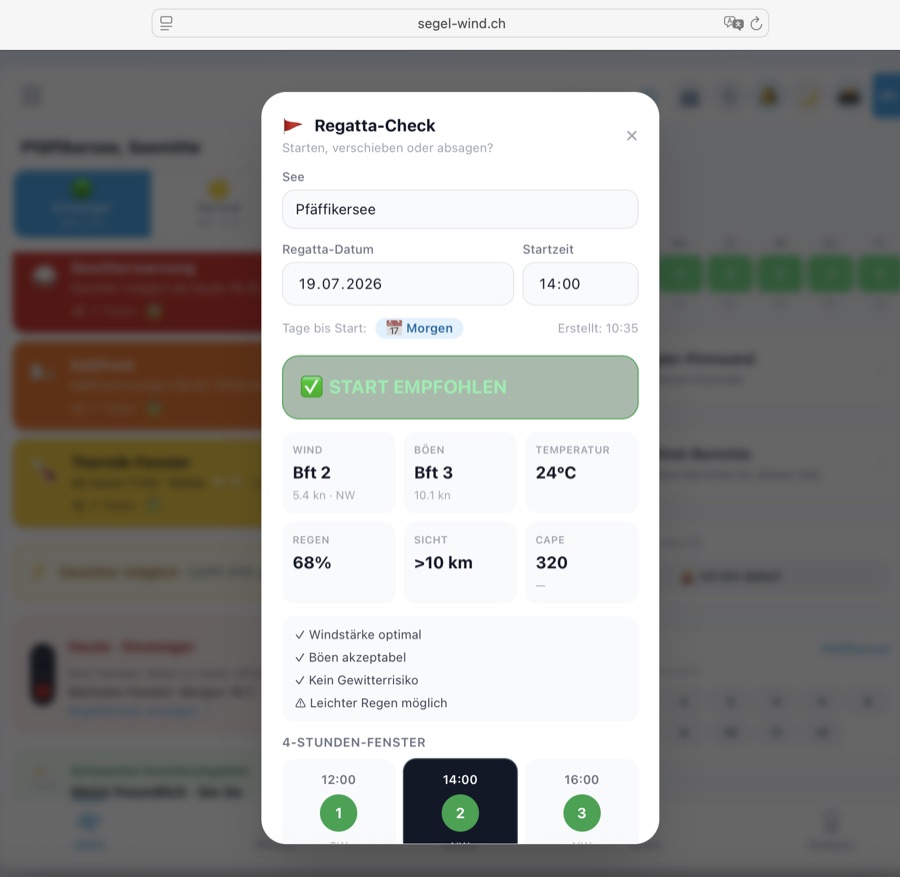
→ Regatten-Kalender öffnenOuvrir le calendrierOpen Regatta Calendar
Weitere Disziplinen: Autres disciplines : Other disciplines: 🏄 Windsurf · 🪁 Kitesurf · 🪂 Wingfoil
Seen-GuideGuide des lacsLake Guide
Jeder Schweizer See hat seinen eigenen Wind-Charakter. Hier findest du die wichtigsten Segelreviere mit Wind-Profil, bester Segelzeit und Sicherheitshinweisen — direkt in der App verfügbar.
Chaque lac suisse a son propre caractère de vent. Retrouvez ici les principaux plans d'eau avec profil de vent, meilleure période de navigation et conseils de sécurité — disponibles directement dans l'app.
Every Swiss lake has its own wind character. Here you find the key sailing waters with wind profile, best sailing time and safety notes — available directly in the app.
Wikipedia (Schweizer Seen) · MeteoSchweiz · Föhn · MeteoSchweiz · Klimaatlas · Swiss Sailing · BAFU Hydrodaten · Wikipedia · Malojawind Wikipédia (lacs suisses) · MétéoSuisse · Foehn · Swiss Sailing · OFEV Hydrodata Wikipedia (Swiss lakes) · MeteoSwiss · Föhn · Swiss Sailing · BAFU Hydro data
Bereit zum Segeln? ⛵Prêt à naviguer ? ⛵Ready to sail? ⛵
Öffne die App und wähle deinen See —
der Wind wartet nicht.Ouvrez l'app et choisissez votre lac —
le vent n'attend pas.Open the app and choose your lake —
the wind won't wait.
⛵
Alle Features freischalten Débloquer toutes les fonctionnalités Unlock all features
Ab CHF /Jahr: Törn-Logbuch, Briefing, Abzeichen, Thermik & mehr. Dès CHF /an: journal de bord, briefing, insignes, thermique & plus. From CHF /year: trip log, briefing, badges, thermals & more.
Jetzt Mitglied werden → Devenir membre → Join now →